SMK-37 Firmware Manager
Tool for SMK-37 Pro / Elite and FM-1 (M-VAVE)
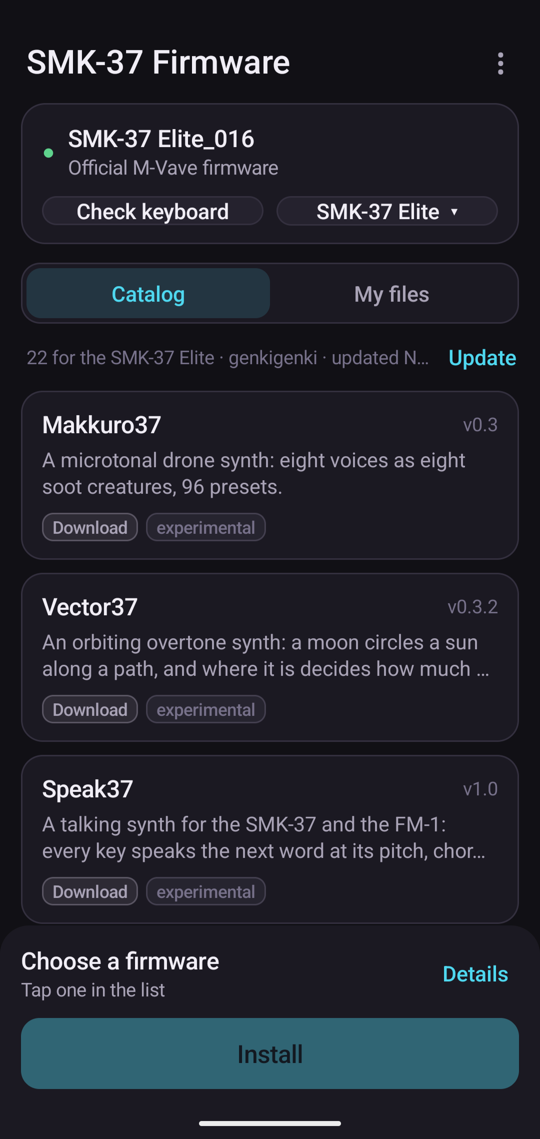
Android app that installs community and official firmware packages on an SMK-37, MKE-P37, Starrykey 37 Play or FM-1 over USB-MIDI, with genkigenki's SMK-37 catalog built in.
by ODeath
- Distribution
- Prebuilt image you flash yourself
- License notes
- LICENSE is the GPL v3 text and the README says GPL-3.0-only, because the protocol code is derived from a GPL-3.0 installer. No firmware package is in the repository; the app downloads them from their publishers.
- Source
- github.com https://github.com/gybe808-dotcom/smk37-firmware-manager
- flasher
- android
- usb-midi
- catalog
Description
The app lists the firmwares on genkigenki's SMK-37 site for the connected model, downloads a package when it is installed and checks it against the SHA-256 the site lists. A .fwsc file of your own can be imported, and the app reports which keyboard it is for, whether it is official or custom and whether its internal checksums agree. The install goes through the keyboard's own update mode, using a Java port of the Felucca installer's protocol code, and an interrupted update can be resumed. Check keyboard shows the running firmware or that the unit is stuck in update mode. The app refuses damaged packages, packages for another device, M-VAVE firmware older than V016 and units running a firmware with its own updater, and it stops before writing in an update mode it does not know unless a switch allows it. It hosts no firmware, does not back up presets and cannot read back the installed firmware. The README describes installing Baud Girl's SMK-37+VA package and going back to stock by importing M-VAVE's official file. It needs Android 8.0 or newer with USB host support and a USB-C OTG cable.
Install notes
Download the signed APK from the release and allow installs from that source on the phone. Connect the keyboard with a USB-C OTG cable, close other MIDI apps and any Chrome tab using the keyboard, then use Check keyboard before installing. The README advises a full flash backup and installing m-bootloader with jvitkauskas' M-Flasher first, which gives a download mode and a recovery menu even when no firmware starts; installing without it is documented as supported, and the official package for your model can be imported to return to stock.
Version history
| Version | Date |
|---|---|
| 0.2.0 | 2026-11-26 |