XMOD
MOD and XM tracker: up to 32 channels with a FastTracker 2 replayer, a ProTracker mode for MODs, a pattern editor and a browser song manager that moves .xm and .mod files to and from the FM-1.
by KotMorderca
- Distribution
- Browser installer (WebMIDI / WebUSB)
- Requires stock
- V15 or another custom firmware (V16 untested)
- License notes
- Stated in the README and THIRD_PARTY.md. The hardware layer is Felucca's (GPL-3.0-only), ft2-clone and pt2-clone code is BSD-3-Clause, the Spleen fonts are BSD-2-Clause and the example songs are CC0. The JieLi SDK files are read from your own checkout at build time and are not in the tree.
- Source
- github.com https://github.com/KotMorderca/XMOD
- Homepage
- kotmorderca.github.io https://kotmorderca.github.io/XMOD/
- tracker
- sampler
- sequencer
- synth-engine
- editor
- emulator
- midi
- usb-audio
- fork
Description
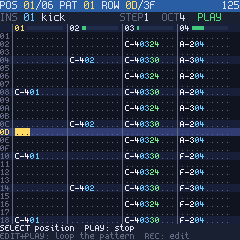
The player is a port of ft2-clone's replay logic, with a ProTracker mode that models Amiga panning and the A500 and LED filters. The pattern editor uses one knob per field and shows 4 or 8 channels. Other pages cover the order list, instruments with volume and panning envelopes, loops and finetune, a mixer with mute and solo, and on-screen help for each XM effect. Up to 32 songs fit in 604 KB of flash, and two example songs are built in. Over USB the unit sends MIDI clock and start and stop, accepts transport and notes, and works as an audio input. A web song manager and a browser simulator are published on the project site. Songs live in an area that other firmwares overwrite, so the README advises backing up before switching, and it says XMOD is untested on V16.
Install notes
Install xmod.fwsc from the release with any FM-1 installer, such as The Firmware Hub, Felucca's web installer or tools/install.cmd; the song manager page also installs a package. After installing from Felucca the FM-1 may need a power cycle. Holding OCT- and OCT+ at power-on gives update mode if it does not start. Songs are kept in flash that other firmwares use for their own data, so back them up with the song manager before switching. Installing is at your own risk.
Version history
| Version | Date | Notes |
|---|---|---|
| 1.2.1 | 2026-11-13 | Accepts both the Puya P25Q80 and the UC25HQ80 flash chip, so newer FM-1s can save and show songs; 1.2.0 and older showed NO FLASH there. The notes say it is not yet tested on a newer unit. On a newer FM-1 running 1.2.0 or older, hold OCT- and OCT+ for five seconds before installing. |
| 1.2.0 | 2026-10-30 | The built-in xmod-theme plays on the first start after an install, and later starts load the last song, stopped. Held keys now play chords on the song's free channels, and MIDI in is polyphonic. Fixes songs with a row break past row 63 looping in one pattern and a BAD SONG IMAGE message after another firmware left songs in flash. Song space is 604 KB, down from 608 KB, so the last 4 KB can keep the last played song. |
| 1.1.0 | 2026-10-29 | Song space grows to 608 KB, the song manager gains Reconnect and Refresh buttons, the encoder scrolls the mixer's channel window, and a volume overflow at full volume with hard panning is fixed. |
| 1.0.0 | 2026-10-28 | First release; the release page has no notes beyond the changelog link. |