Teachie Beachie
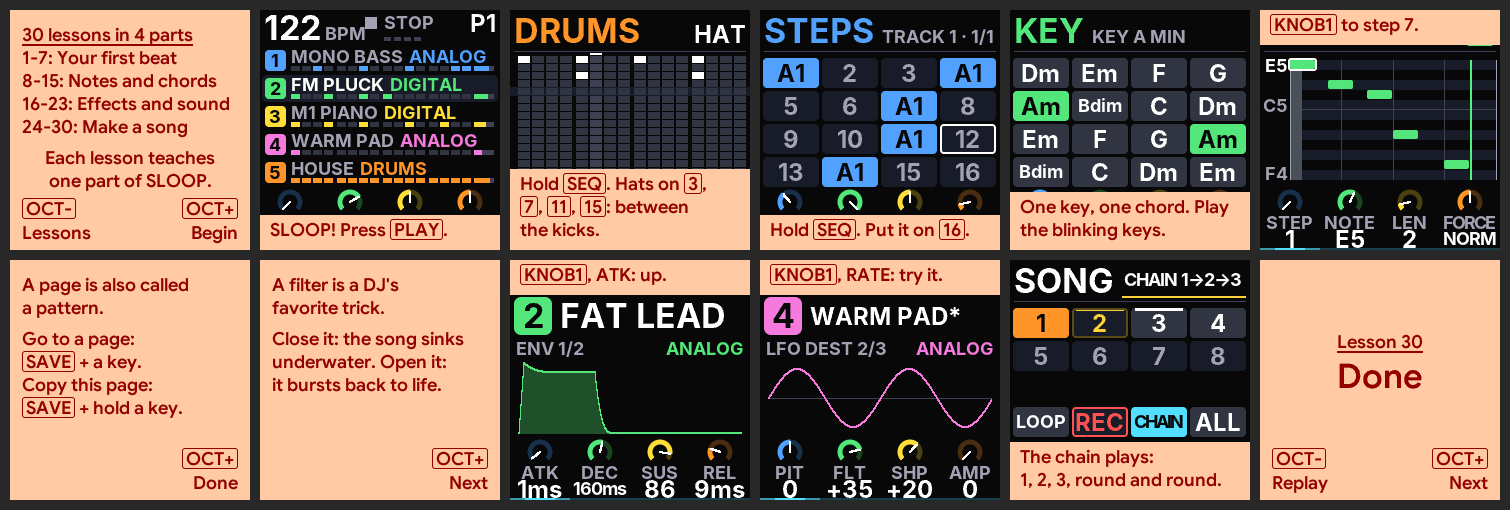
SLOOP 3 with thirty guided lessons built into the FM-1: each lesson shows a card and a strip on the screen, blinks the key to press and checks the step before moving on.
by davydegravy
- Distribution
- Browser installer (WebMIDI / WebUSB)
- Requires stock
- m-bootloader on the unit (the installer page explains how to set it up)
- License notes
- The LICENSE file is the GPL-3.0 text and TEACHIE-BEACHIE.md says it uses the same licence as SLOOP 3. The factory sample bank inherited from SLOOP 3 is CC0 and its screen fonts are SIL OFL 1.1. The repository holds that sample bank (assets/samples.bin) and no firmware package.
- Source
- github.com https://github.com/davydegravy/teachie-beachie-fm1
- Homepage
- davydegravy.github.io https://davydegravy.github.io/teachie-beachie-fm1/
- education
- sequencer
- groovebox
- ui
- ai-assisted
Description
Teachie Beachie is a build of SLOOP 3.3.7-beta that adds a lesson player to the firmware, aimed at children and beginners. At start a card offers a lesson with OCT+, and OCT- goes straight to SLOOP 3. A peach card explains one idea, a strip over SLOOP's own page says what to do, the button or key to press blinks, and the lesson moves on when the step is done. A hint appears after a while, and the lesson can offer to do the step itself. The course has thirty lessons in four parts (first beat, notes and chords, effects and sound, making a song) and works on one song written for it. The lessons are sent to a sample slot by the installer page, and can be resent alone later. The instrument itself is unchanged SLOOP 3, including its web editor. The repository description calls the project BOATSWAIN, while its README and pages say Teachie Beachie. The README says it has been tested on one FM-1 with the original flash chip and not on the newer UC25HQ80 chip, and the lessons are in English. The lessons are plain text files, and the repository includes guides for working on them with an AI assistant.
Install notes
Installs from the project page in desktop Chrome or Edge over USB MIDI, through m-bootloader. The page checks for m-bootloader (hold PLAY at power-on), explains how to set it up if missing, backs up the whole 1 MB flash, checks the package before erasing, installs, and then sends the lessons. Going back means restoring that backup with M-Flasher or installing SLOOP 3 from its own page. The README says m-bootloader opens a recovery menu if an install is interrupted. The author tested one FM-1 with the original flash chip.
Version history
| Version | Date | Notes |
|---|---|---|
| main @ bfba737 | 2026-11-24 | No tagged releases; this is the latest commit. |