PLAYA
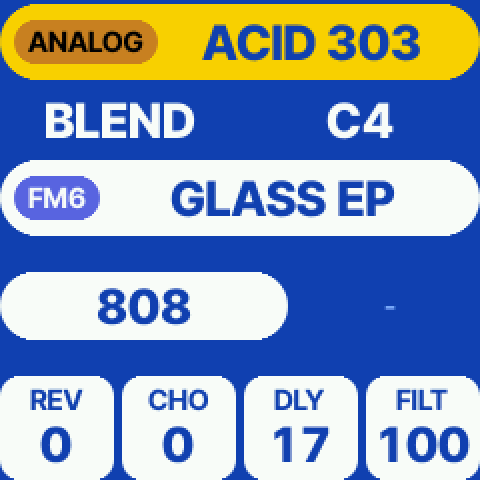
Optimist build for live playing: two synth layers on one keyboard (layer, split, blend or single), a drum kit with a step sequencer, send effects, Bluetooth MIDI keyboards and a one-screen interface edited with knobs 1 to 4.
by juan-ms2lab
- Distribution
- Prebuilt image you flash yourself
- Requires stock
- V15 or another Felucca-family firmware
- License notes
- The README and LICENSING.md state GPL-3.0-only, as Optimist. Assets carry their own terms listed in LICENSING.md, including the Inter Tight font (SIL OFL 1.1). The repository also holds the stock V15 package that M-VAVE licenses for redistribution (git blob ce49cc15, the same file as in m-vave/fm1_open), and a small calibration dump from the Optimist author's unit.
- Source
- github.com https://github.com/juan-ms2lab/playa
- synth-engine
- performance
- drums
- sequencer
- fx
- bluetooth
- midi
- fork
Description
A fork of Optimist that keeps its engines, effects, drums, storage, update loader and recovery, removes most of what a performance does not need (the full step sequencer, sampling, SD card, Wi-Fi and macros) and adds a performance layer. Two layers on MIDI channel 1 each have their own engine, sound, effects and level, and can be stacked, split at a note, crossfaded around the split or used alone. The engines are PROPHET, FM6, ANALOG, DIGITAL and JUNO, with twelve voices shared between the layers. Drums sit on channel 10 with 32 kits and a sixteen-step sequencer. Each panel button opens one page, the four knobs always match the boxes on screen, and eight external knobs can drive the same controls on editable CC numbers. The unit also pairs with Bluetooth MIDI keyboards, and there are five colour themes and slots for whole performances. The build is Optimist's classic build with a performance-v1 profile, and its packages identify as FM-1_780. The release notes report installs on a real FM-1 from V15, Melodee and fm-106 and back to V15 with its own update loader. Support for the UC25HQ80 flash chip of newer units is not yet tried on such a unit. The README says it was made by its author with Claude.
Install notes
Back up first, because installing over another firmware may erase the projects and user presets in flash. Install the .fwsc from the release with Optimist's web installer or with tools/optimist.py flash. If an install is cut off, run it again, and if the FM-1 does not start, hold OCT- while switching on for the USB rescue and flash again. The README links a guide for returning to the official firmware.
Version history
| Version | Date | Notes |
|---|---|---|
| 0.1 | 2026-11-10 | First release, a .fwsc with identity FM-1_780 built with the performance-v1 profile. Tested on one real FM-1 with layers, split, blend, drums, effects and a USB keyboard. |