Octo-Vave
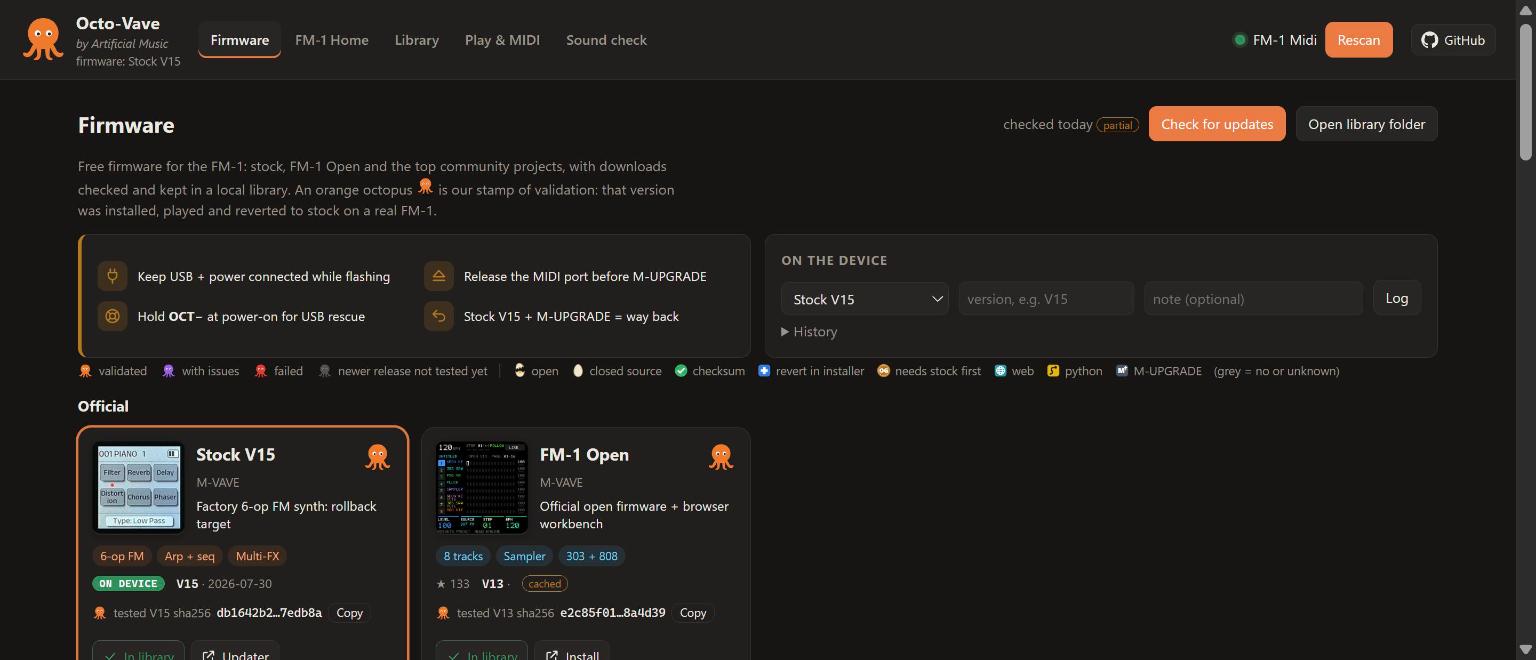
Local Python and browser app for the FM-1: ranks and downloads community firmware into a checked library, keeps patches and a DX7-style voice editor for the stock firmware, and has MIDI tools and guided sound checks.
- Distribution
- Prebuilt image you flash yourself
- License notes
- Copyright is held by Artificial Music. The firmware screen captures in web/img/fw belong to their projects and are credited in firmware/catalog.json.
- Source
- github.com https://github.com/amacias/octo-vave
- Homepage
- amacias.github.io https://amacias.github.io/octo-vave/
Quality
Rising
Under a year old, with real traction.
- MaturityModerate
0.1 years · 3 releases · 129 commits
- PopularityLow
★ 5 · 0 forks
- VitalityStrong
129 commits last year · last activity 2026-11-22
- Issue healthStrong
14 closed / 5 open · 4 of 4 PRs merged
- InfluenceLow
0 catalog entries build on this
- CommunityModerate
3 contributors · bus factor 1
Data from GitHub, 2026-11-23. How ratings work.
- librarian
- editor
- config-tool
- midi
- sysex
- utility
- web-ui
Description
A small Python server on 127.0.0.1 and a page in Chrome or Edge, with nothing to install beyond Python 3. The Firmware page rebuilds a ranking of free firmware with .fwsc releases from the awesome-fm-1 list and a GitHub search, tags each card (open or closed source, published checksum, return-to-stock option, installer type), downloads files into a local library and compares each SHA-256 with what the project publishes. A card also records hands-on validations, an install, a play session and a revert to stock V15, with the tested file's hash. The FM-1 Home page has a key bed, effects controls and a DX7-style voice editor, and the Library, Play and MIDI, and Sound check pages hold firmware-aware patches, a generic MIDI utility with a monitor, and listening tests. It does not flash anything, so each project's own installer or M-UPGRADE does that. It overlaps with this catalog as a firmware directory, but also edits and tests the device over MIDI. Note: when asked, it downloads M-VAVE's current stock firmware, the M-UPGRADE updater and the FM1 Open releases directly from M-VAVE's own servers into the local library; these are not limited to the Apache-licensed V15 image, and the tool itself redistributes none of them.
Install notes
Clone or unzip the repository and run python server.py (or start.cmd on Windows), then open http://127.0.0.1:8765. On Windows 10 or 11 the release also has an MSI installer that needs no Python; it is not code-signed, so Windows may warn. It never flashes firmware. Its downloads come only from GitHub release assets and an allowed host list that includes M-VAVE's own file servers, which serve the stock FM-1.fwsc and M-UPGRADE.zip when you ask for the Official card. The repository itself contains no firmware images. The voice editor and effects controls target the stock firmware only. Developed and tested on Windows 11 with Chrome.
Version history
| Version | Date | Notes |
|---|---|---|
| 1.0.107 | 2026-11-10 | Each firmware card gets two main actions, Install and Validate for the listed version; a failed version stays selected for another try, local validations can be redone and installing stock V16 shows a one-way warning. Windows MSI only. |
| 1.0.104 | 2026-11-10 | Shows the version in the header, adds Revalidate, stock V16 validation and a More toggle, greys out validations superseded by newer releases and refreshes the homepage's firmware list. Windows MSI only. |
| 1.0.92 | 2026-11-08 | First tagged release; a Windows 10 and 11 installer (Octo-Vave-win64.msi, not code-signed) that needs no Python and keeps settings and downloaded firmware in the user's profile. |