ObsSynth FM-1
Four-voice subtractive synth with STD, SUPER, wavetable and granular oscillator engines, two LFOs, delay, reverb and chorus, drawn after the ObsSynth desktop instruments, with a WebAssembly simulator of the same code.
by orianbsilva
- Distribution
- Browser installer (WebMIDI / WebUSB)
- Requires stock
- V15
- License notes
- Stated in LICENSING.md. Felucca code is Leo Kuroshita's and Hortator's changes are DEADACTIVE's, each under their own notices; the recovery tool's boot-mode code is MIT from jl-uboot-tool. Felucca's panel photograph and sample pack are not in the tree.
- Source
- github.com https://github.com/orianbsilva/obssynth-fm1
- Homepage
- orianbsilva.github.io https://orianbsilva.github.io/obssynth-fm1/
- synth-engine
- oscillator
- filter
- wavetable
- granular
- lfo
- fx
- usb-midi
- emulator
- web
- fork
Description
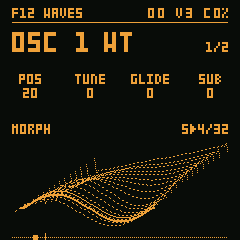
Each of two oscillators runs one of four engines: standard waveforms, a seven-voice supersaw with a choice of saw, square, triangle or sine, wavetable banks, or granular playback of three samples (organ and bell from VCSL, CC0, and a generated voice). A sub oscillator, six noise colours, sync and ring modulation feed a 12 or 24 dB filter (low-pass, band-pass, high-pass, notch) and amp, each with its own ADSR. Modes are poly (4 voices), mono, legato and unison. Two LFOs have one destination each, and the effects are delay, room reverb and stereo chorus. There are 16 factory presets and 16 user slots, and each page draws what it edits, such as envelope curves, filter response and live grains. It appears as the USB-MIDI device ObsSynthFM1. The base comes from Hortator, itself a Felucca fork, with the drum machine removed; the HAL, update loader and simulator structure are kept. The README says 0.1.0 was installed from stock V15 and from another custom firmware on an FM-1 and removed again.
Install notes
The README says the package is also on The Firmware Hub, which installs it from the browser; tools/fm1_install.py works from a terminal. The installer resumes an interrupted update, and holding OCT- and OCT+ for 5 seconds enters the chip's boot mode (docs/RECOVERY.md). Presets and settings sit in their own flash area, and other firmwares' projects and samples may be overwritten, so back them up first. To return to stock, use M-VAVE's M-UPGRADE with the V15 package.
Version history
| Version | Date | Notes |
|---|---|---|
| 0.2.0 | 2026-11-15 | The release page has no notes. The commit adds SAW, SQR, TRI and SIN shapes to SUPER and two presets, SQUARES and GLASS. |
| 0.1.1 | 2026-11-15 | The release page has no notes. The commit gives the package its own identity, FM-1_627010. |
| 0.1.0 | 2026-11-13 | First release. |