nullwave
Six-channel groovebox for the FM-1 where any channel can be a synth, drum kit, sampler or granular voice, with per-channel sequencers, scenes chained into songs, punch-in effects and USB, TRS and Bluetooth MIDI.
by nullwave
- Distribution
- Browser installer (WebMIDI / WebUSB)
- License notes
- The LICENSE file is the MPL-2.0 text. The built-in recordings are CC0 1.0 (assets/samples-cc0), Felucca-Engines is MIT, fm1-base and felucca-bsp are MPL-2.0, and CREDITS.md lists the Apache-2.0 JieLi SDK files the build takes.
- Source
- github.com https://github.com/nullwave-cc/fm1
- Homepage
- nullwave.cc https://nullwave.cc/fm1/
- groovebox
- sequencer
- synth-engine
- drums
- sampler
- performance
Description
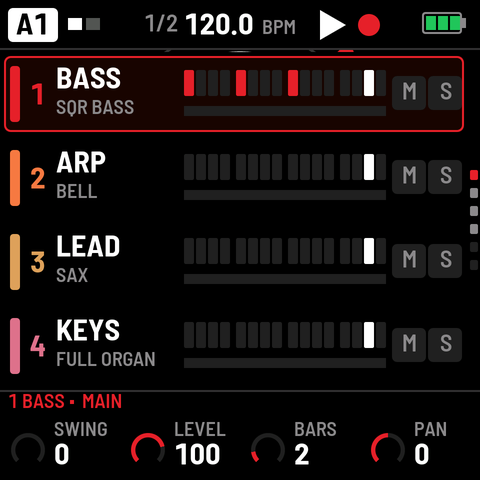
All six channels share one pool of voices, so there is no fixed drum track. Each channel plays one of fourteen engines: ANALOG, FM6, PHASE, LOFI, SAMPLE, VOICE, TRIO, WHEEL, GRAIN, PHYS, NOISE, SLICE, DRUM and a SUPER saw-stack engine, with two edit pages and a list of sounds each. The ANALOG, LOFI, TRIO, WHEEL, NOISE and PHASE engines come from Felucca-Engines. Every channel has its own pattern sequencer, mix strip and MIDI channel; held buttons turn the white keys and four knobs into layers such as punch-in effects, and the keys can play scales and chords. Patterns go into scenes that switch live and chain into songs, with eight songs kept on the unit. The built-in samples are CC0 recordings of a piano, a flute and a tenor saxophone plus a generated drum break. The README lists a looper that records the internal mix, a web editor, user samples and a fuller engine set as the plan for 1.0, and the manual says user samples are not available yet. It builds on fm1-base and felucca-bsp and shares no code with GPL-licensed firmware.
Install notes
The docs ask for a full flash backup with M-Flasher first, without its bootloader option, then install from the project's web installer in Chrome or Edge over USB, or with base/tools/fm1_install.py. The way back is the installer's Back to the stock firmware button, M-UPGRADE, or restoring the backup. Holding REC at power-on enters the chip's update mode, two failed starts open a safe mode, and holding HOME resets settings. Installing m-bootloader is an optional extra the installer offers.
Version history
| Version | Date | Notes |
|---|---|---|
| v0.1.3 | 2026-11-27 | Adds a new logo on the boot, install and factory-reset screens, and the installer finds the FM-1 again when it returns from an update as a new USB device. |
| v0.1.2 | 2026-11-27 | The FM-1 shows as FM-1 by nullwave over USB, with its own serial number, and as nullwave FM-1 over Bluetooth. |
| v0.1.1 | 2026-11-27 | The nullwave editor works with the FM-1 over USB: it follows and controls the transport, scenes, presets and settings, and SETTINGS gets an EDITOR page. |
| v0.1.0 | 2026-11-26 | First release. It holds nullwave-0.1.0.fwsc and archives of the screens and the site. |