METRONOME
Stage metronome with sixteen songs on the white keys, each with its own tempo, meter, step pattern and sound, a web setlist editor, and a live page that follows the unit over USB or Bluetooth.
by Da-Wei Lee
- Distribution
- Browser installer (WebMIDI / WebUSB)
- License notes
- The README gives GPL-3.0-or-later and the LICENSE file holds the GPL-3.0 text; the common/ folder is MIT and fm1-base, included as a submodule, is MPL-2.0. No M-VAVE stock image is in the repository.
- Source
- github.com https://github.com/daviddwlee84/fm1-metronome
- Homepage
- daviddwlee84.github.io https://daviddwlee84.github.io/fm1-metronome/web/
- utility
- performance
- midi
- usb-midi
- ble-midi
- editor
- emulator
- web
Description
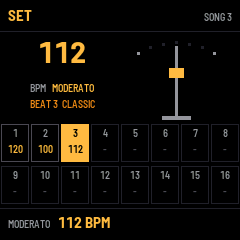
The SET page holds sixteen songs; pressing a white key starts that song at the next bar, or at once, and the tempo's classical marking (LARGO to PRESTO) shows beside the BPM. A song is either a GRID, where each step of the bar is off, ghost, normal or accent with beats, subdivisions and meter presets such as 6/8, 7/8 2+2+3 and 5/8 3+2, or a CLASSIC page with four layered volumes (quarter, eighth, triplet, sixteenth) and an accent every one to nine beats. Tap tempo is on the black keys, and three click sounds are available. A browser page edits the setlist and sends it over USB MIDI or Bluetooth MIDI, a Python command line backs it up and restores it as JSON, and a second page plays along with a conductor beating the meter and can sound the clicks from the computer while the unit mutes itself, sounding again if the link drops. The firmware is a C app on fm1-base with a host simulator and tests, and a browser emulator page runs it without a unit. Settings and the songs take 460 bytes at 0xCE000 to 0xCFFFF, which on Felucca-family firmwares lies inside the sample area.
Install notes
The README advises backing up the unit's flash first with M-Flasher. Install it from The Firmware Hub in Chrome or Edge over USB, or download metronome-X.Y.fwsc from the release and install it with M-Flasher or fm1-base's tools/fm1_install.py. The package carries fm1-base's update loader, so another firmware can be installed from it afterwards. It does not read other firmwares' projects or samples and writes nothing outside its own firmware area, apart from the 460-byte record, and an update to another firmware stages its loader at 0xE0000. It was tested on a unit with the newer flash chip.
Version history
| Version | Date | Notes |
|---|---|---|
| 0.4 | 2026-11-20 | Adds the live page for playing along, clicks sounded by the computer, and Bluetooth MIDI beside USB; the setlist record is unchanged, so an update from 0.3 keeps the songs. |
| 0.3 | 2026-11-19 | First release, with the setlist editor over USB. |