M1n1Le55
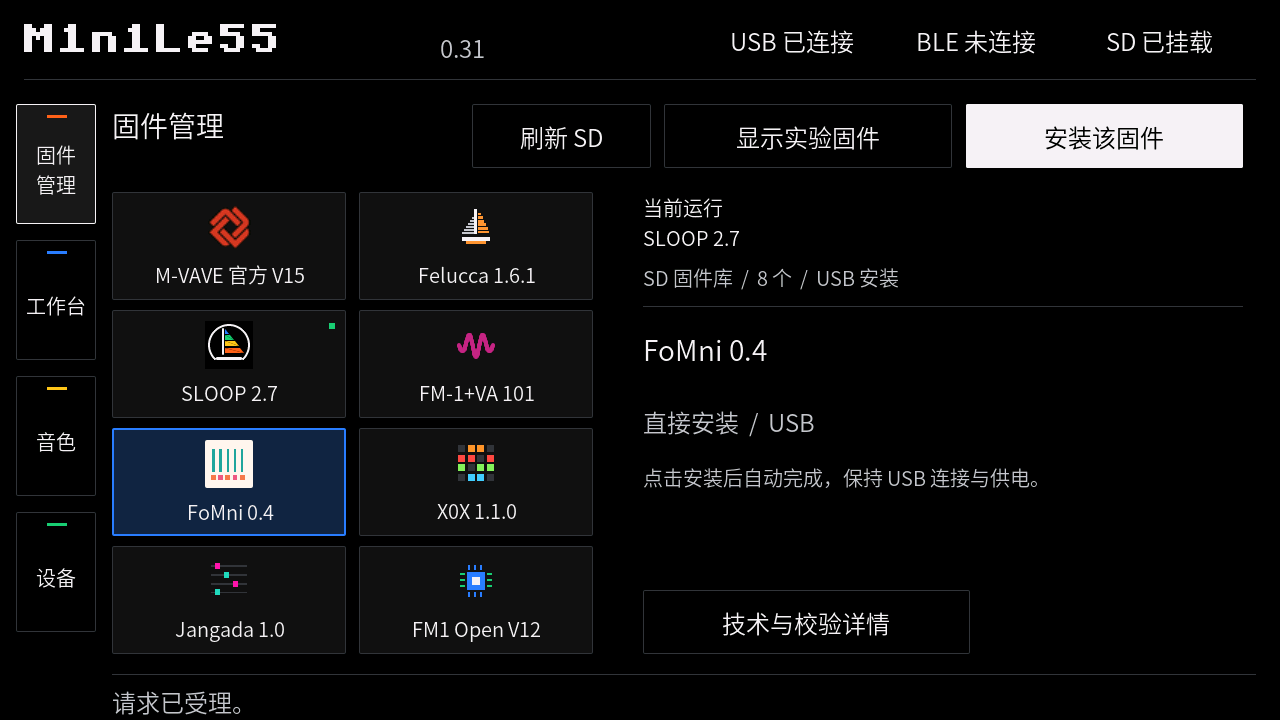
Touchscreen firmware manager and control console for the M-VAVE FM-1, running on an M5Stack Tab5 with the FM-1 on its USB host port; it installs firmware from an SD card and edits parameters of supported firmwares.
by ZzpsS
- Distribution
- Prebuilt image you flash yourself
- License notes
- MIT covers the project's own code. Third-party components, including ESP-IDF, LVGL and the firmware icons (one of them under SLOOP's GPL-3.0), keep their own licences, whose texts are in the licenses directory.
- Source
- github.com https://github.com/ZzpsS/M1n1Le55
- Homepage
- github.com https://github.com/ZzpsS/M1n1Le55/releases/tag/v0.31-grid-1
- flasher
- loader
- utility
- platform
- editor
Description
The Tab5 has four screens: firmware management, a workbench whose pages follow the firmware currently on the FM-1, a voice page with optional sample transfer, and a device page for connection status, backups and a log. Installation uses exact catalogued packages from a FAT32 card and puts V15 in between automatically when a route needs it. Packages for Felucca, SLOOP, FM-1+VA, FoMni, X0X, Jangada, FM1 Open and the official V15 are supported and are not included; the user obtains them from their authors. The Tab5 side is an ESP-IDF application with an installer and an SD preparation tool for Windows in the release package. The author tested a firmware upgrade of one Tab5 and its connection to an FM-1 but not a first install on a new Tab5, and notes that sample transfer and Bluetooth have limited testing.
Install notes
Needs an original M5Stack Tab5 (ESP32-P4, 16 MB flash) and an FM-1; other ESP32-P4 boards are not targeted. Download the release zip, connect the Tab5 by USB-C and flash the bootloader, partition table and application with the commands in the quick-start guide. The first install leaves the Tab5's wireless chip alone. To change FM-1 firmware, prepare a FAT32 card with the bundled Windows tool, keep USB and power connected during the install, and have a recovery route ready.
Version history
| Version | Date | Notes |
|---|---|---|
| 0.31-grid-1 | 2026-10-22 | Pre-release with a two-column firmware grid and a bilingual install package. |