FMutate
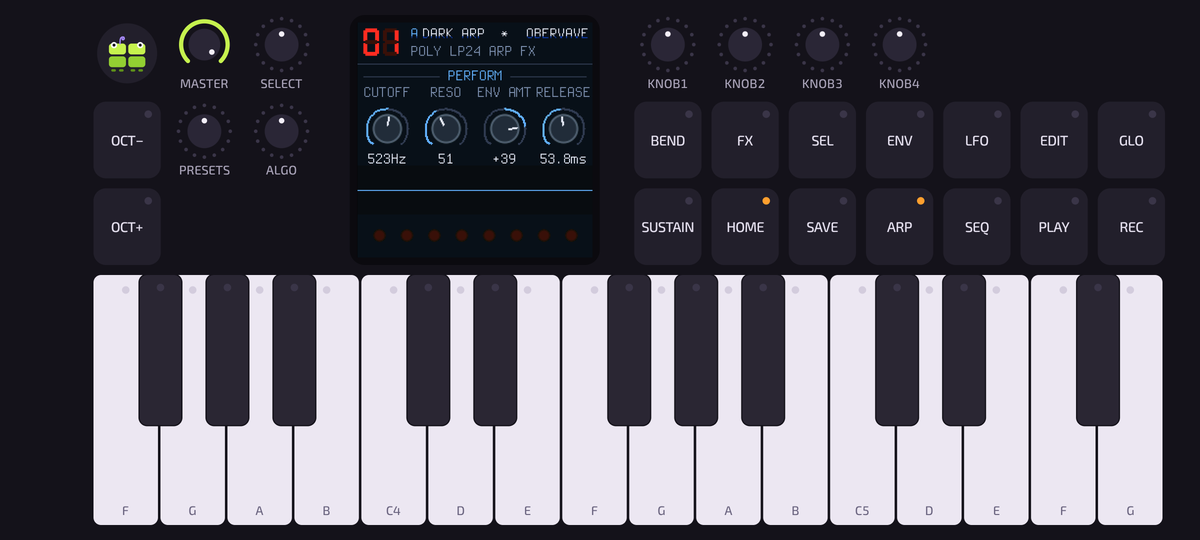
Android app that runs FM-1 community firmwares on a phone, with a multitouch panel you can rearrange, a firmware library fed by the FM-1 Firmware Hub catalogue and a virtual MIDI port.
by GenericJam
- Distribution
- Prebuilt image you flash yourself
- License notes
- The LICENSE file is MIT and covers FMutate's own app code. The README says the shipped APK is not MIT-only, because the native build compiles GPL firmware into cartridges and distributing them needs GPL compliance. OberVave and Shine On are by zvenson (GPL-3.0), fm1-emu is MIT, and the Hub catalogue is CC BY 4.0. Every firmware belongs to its author and is downloaded from where they publish it. A 1 KB test fixture .fwsc in the repository is not a stock image.
- Source
- github.com https://github.com/GenericJam/fmutate
- emulator
- performance
- midi
- usb-midi
- ui
Description
Firmwares run in two ways. Native cartridges are firmwares built from source for the phone: OberVave and Shine On are built in, and 0.2.0 downloads native builds of Hub firmwares from FMutate cartridges. Any other firmware's update package (.fwsc), binary-only ones included, runs in fm1-emu. Each firmware runs in its own process, so a crash restarts only that instance, and one that crashes twice in a minute is quarantined until you choose to run it anyway. The library downloads from the Firmware Hub catalogue, imports your own .fwsc files (M-VAVE's stock firmware is bring-your-own) and switches with one tap and undo. The panel starts as a classic FM-1 layout and can be edited into any arrangement of keys, knobs, pads, sliders and pages, saved per firmware. Keys take velocity from where they are struck, and with OberVave a held note's level follows the finger. Audio goes out through AAudio, and there is a virtual MIDI port, USB and Bluetooth MIDI devices and MIDI clock in and out. Layouts and sounds (a synth's whole memory) can be saved under a name, exported and imported as JSON files, with undo and redo for layout changes, and a balance knob sets the synth's stereo balance in FMutate's mixer. Controls can also be bound to motion sensors (tilt, twist, shake, proximity), and MIDI learn with automap profiles covers two MPK mini models. The README calls it early: Android only, tested on two Moto G Power phones and Android 17 emulators.
Install notes
Download FMutate.apk (the same file as fmutate-0.3.3.apk) from the release and open it on an Android 9 or later phone, or run adb install; the release is signed with the project's key, which changed in 0.2.0, so 0.1.0 has to be uninstalled first, and a copy built from source has to be uninstalled first because it uses a debug key. To build it yourself, use mise (Erlang, Elixir, Java, Zig and Rust at the pinned versions), the Android SDK with NDK 27.2 and adb, then deploy with mix mob.deploy to a phone with USB debugging on. The app writes nothing to a physical FM-1.
Version history
| Version | Date | Notes |
|---|---|---|
| 0.3.3 | 2026-11-27 | Installs over 0.2.x and 0.3.x and keeps layouts, sounds and saves. Adds a Reset to original action in the Sounds menu, with an undo, that puts the running synth back on its first-start settings, and stops a confirmation answered during a load or save from starting a second one. |
| 0.3.2 | 2026-11-24 | Installs over 0.2.x and 0.3.x and keeps layouts, sounds and saves. The built-in Shine On string ensemble now takes per-note level, as OberVave does, so on a keyboard strip that plays by strike position a held key fades as the finger slides back from where it struck. |
| 0.3.1 | 2026-11-24 | Installs over 0.2.x and 0.3.0 and keeps layouts, sounds and saves. Adds MIDI out, so XY pads, motion tiles, knobs, sliders, pads and keys can drive other apps on the phone or a computer over USB as a MIDI controller, with a Synth, Out or Both choice in each control's binding. Sends note offs and all notes off when the instrument is left, and a native firmware from the library gets pitch bend and per-note level when its signed release declares them. Signed with the same release key. |
| 0.3.0 | 2026-11-23 | Installs over 0.2.x and keeps layouts and saves. Adds named layouts that can be saved, loaded, exported and imported as JSON, with undo and redo for layout changes, named sounds that save a synth's whole memory and load it back later, and a balance knob for the synth's stereo output in FMutate's mixer. The mixer's crossfade commands no longer race the audio thread. Signed with the same release key as 0.2.0. |
| 0.2.1 | 2026-11-22 | Installs over 0.2.0 and keeps layouts and saves. With OberVave a strike at the top of a key is now clearly quieter than one at the bottom (about 20 dB at the softest default), held and arpeggiated notes keep their key's level, the Opling menu button has larger eyes, quitting saves a firmware's settings more reliably and bundled libraries get security updates. Signed with the same release key as 0.2.0. |
| master @ 98e6d4c | 2026-11-21 | Commit on the master branch after v0.2.0 and before 0.2.1. The newest commits add an iOS build 6 with a velocity fix and poly-aftertouch fixes for OberVave, and a CI tests workflow for Elixir, Android and Swift. |
| 0.2.0 | 2026-11-20 | Signed with a new release key, so 0.1.0 must be uninstalled first, which removes its saved data. Adds native builds of Hub firmwares (130 at release, from FMutate cartridges), a page for each firmware with its README, MIDI learn and automap profiles for the MPK mini mk2 and mk3, velocity from the strike position and per-note level on by default, a quit action on the notification and pairing with sibling apps by QR code. |
| 0.1.0 | 2026-11-13 | First sideloadable release, a signed APK for Android 9 and later with OberVave 3.3.2 and Shine On 3.0.1 built in. It adds motion controls (tilt, twist, shake and proximity), strike-position velocity, a long-release sustain, MIDI clock and playback with the screen off. |