FM1amp
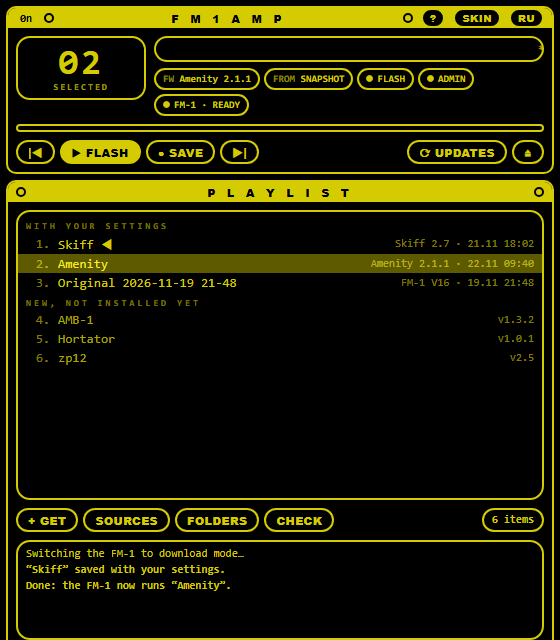
Windows app in the style of Winamp that keeps several FM-1 firmwares on one unit and switches between them, saving and restoring each one's projects and settings as a snapshot.
by 0n4a1n
- Distribution
- Prebuilt image you flash yourself
- Requires stock
- Any FM-1 firmware
- License notes
- The LICENSE file is the MIT text. THIRD_PARTY.md lists the bundled M-Flasher 0.12.1 (MIT), Python, pywebview and other libraries under their own licences. No firmware is bundled.
- Source
- github.com https://github.com/0n4a1n/fm1amp
- flasher
- utility
- backup
- switcher
- windows
Description
A playlist lists firmwares and saved states, and Flash writes the chosen one through M-Flasher, which ships inside the app and is checked by hash. Before every write the app saves a full snapshot of what the FM-1 holds, firmware together with its projects and settings, and the first one is kept as Original with the date as the way back to the stock firmware. Restoring a snapshot passes M-Flasher's keep-bootloader option, and firmware packages go to the app area only. It downloads firmwares from The Firmware Hub catalog or from other catalog.json files and author repositories on GitHub, refuses any download that has no sha256, and offers updates for the firmwares in the library. A badge shows whether the unit is ready, needs REC held at power-on to enter download mode, or is not found. There are four skins and English and Russian interfaces. The README warns that a snapshot is the unit's whole 1 MiB flash with its unit id and calibration, and says not to share it.
Install notes
Unzip FM1amp-0.2.0-windows.zip from the release and run FM1amp.exe on Windows 10 or 11 64-bit; the app asks for administrator rights and the unsigned exe may trigger SmartScreen, so the README tells you to compare the zip with the published sha256 file. A firmware that cannot enter download mode itself needs REC held while the unit is switched on. The README says flashing is at the user's own risk and describes the stock return through the Original snapshot; M-Flasher also keeps its own backups.
Version history
| Version | Date | Notes |
|---|---|---|
| 0.2.0 | 2026-11-24 | First public Windows build, with M-Flasher 0.12.1 bundled and a sha256 file for the zip. |