fm1key
C program for a Raspberry Pi 3 that sends the JieLi USB key to a dark FM-1 so its mask-ROM bootloader appears, then hands the USB lines to the Pi so M-Flasher can back up and restore firmware.
- Distribution
- Build from source yourself
- License notes
- The LICENSE file is the MIT text, copyright Markus Broecker.
- Source
- github.com https://github.com/broecker/fm1-revive
- loader
- utility
- flasher
Description
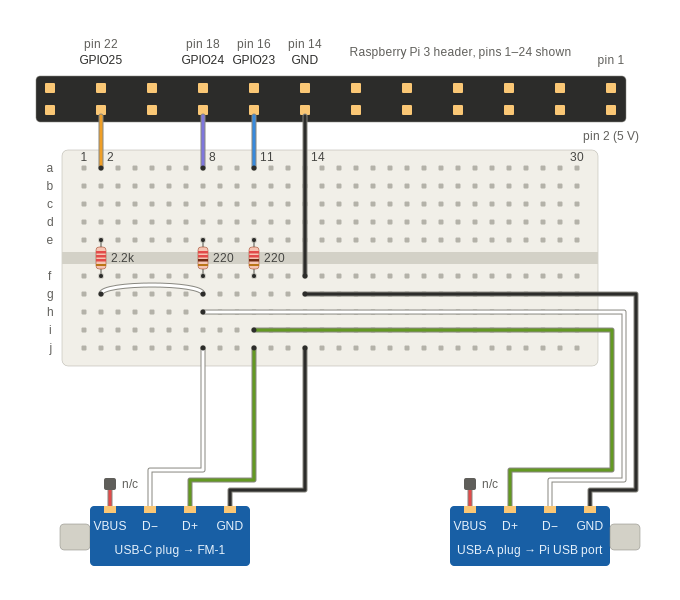
For an FM-1 that shows nothing on USB and ignores OCT- at power-on. The program sends the 16-bit key on two GPIO pins wired to the USB data lines, waits for the chip's acknowledgement, sends the clock-trim pulses and then lets go of the lines so the Pi's own USB port, wired to the same two lines, enumerates the bootloader. An option runs a command such as m-flasher once the bootloader is on the bus, and a self-test checks the breadboard wiring before the FM-1 is connected. The README gives a resistor and breadboard layout with a wiring diagram, and the FM-1 runs on its battery with VBUS left unconnected. It does not write to the FM-1, and the README points to M-Flasher for backup and install. The author reports one successful recovery with one Pi 3 and one FM-1 and says other Pi models need code changes.
Install notes
Needs a Raspberry Pi 3 or 3B+ on 64-bit Raspberry Pi OS, a USB-C plug and a USB-A plug broken out to D+, D- and GND, two 220 ohm resistors, one 2.2 kohm resistor and a breadboard. Build with make on the Pi, run the wiring self-test, then start the program before switching the charged FM-1 on. Use M-Flasher to read a backup before writing any package; no firmware is included.
Version history
| Version | Date | Notes |
|---|---|---|
| main @ b8d04bd | 2026-11-11 | No tagged releases; this is the latest commit. |