FM1 Kids
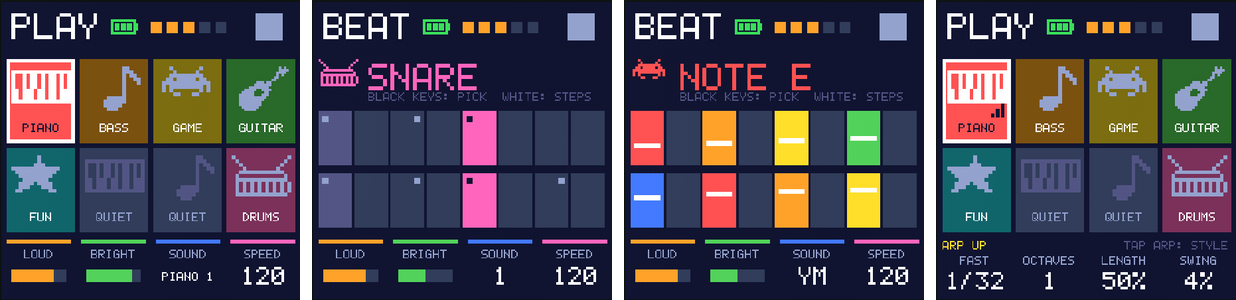
Child-friendly interface for the FM-1 built on M-VAVE's open FM1 Open: picture tiles instead of menus, a pentatonic scale on the keys, a drum and melody step grid on the white keys, an arpeggiator and a volume cap.
by cds879
- Distribution
- Browser installer (WebMIDI / WebUSB)
- License notes
- The app is GPLv3 only with M-VAVE's FM1 SDK linking exception (LICENSE.md), as in FM1 Open. The sound engines come as M-VAVE's binary SDK under separate terms (THIRD_PARTY.md), which the repository carries together with M-VAVE's FM-1 V15 recovery image (sdk/firmware/FM-1_015.fwsc, byte-identical to the licensed file in m-vave/fm1_open).
- Source
- github.com https://github.com/cds879/FM1-Kids-Firmware
- Homepage
- cds879.github.io https://cds879.github.io/FM1-Kids-Firmware/
- fork
- sequencer
- arpeggiator
- ui
- controller-mode
- emulator
Description
Replaces only the screen code of FM1 Open and keeps its sound engines. Eight instrument tiles (piano, bass, game, guitar, fun samples and drums) are chosen with SELECT, and melodic instruments play a C major pentatonic scale so every key fits. BEAT mode turns the 16 white keys into steps and the black keys pick the drum or note, with the key lights showing the pattern and playhead. The arpeggiator has up, down, bounce and random with speed, octave, length and swing, and four knobs cover loudness, brightness, sound and speed. Songs save themselves, EDIT is undo, the volume is capped and a battery gauge warns when charging is needed, and holding GLO opens a parent panel for Bluetooth MIDI keyboards. The firmware update path stays M-VAVE's own, so stock or another community firmware installs over it. It also has 15 instruments, one-key chords, silly sounds, eight play-along tunes where the next key lights, song parts and 16 demo songs, and holding HOME shows help for the page. The README says release builds are checked in an FM-1 emulator, earlier versions ran on a real FM-1, and version 1.0 still needs a physical-device smoke test. The project is unofficial and not affiliated with M-VAVE.
Install notes
Install from the hosted page in Chrome or Edge over USB-C. The flashing guide recommends building an FM-1 Transporter recovery dongle and taking a full backup before the first install, then installing the original-UI build of the repository before the Kids build. Building from source uses Docker on macOS or Linux, or M-VAVE's scripts with the JieLi Windows toolchain.
Version history
| Version | Date | Notes |
|---|---|---|
| 1.0 | 2026-11-14 | Keeps the picture-based interface and controls. Holds notes when the parent Bluetooth panel opens, restores octave, scale and chords after Play Along, and updates the installation, controls and emulator guides. The release notes say the final changes await a physical-device test. |