Jambox FM-1 with sounds
Patch set on Jambox FM-1 0.8.1 that builds 64 DX7 voices into the firmware, picked with two knobs on the Play page, and adds a screen-description command to the editor's SysEx.
by ceritium
- Distribution
- Browser installer (WebMIDI / WebUSB)
- Requires stock
- V15 or FM1 Open
- License notes
- The LICENSE file is the GPL-3.0 text and the README says GPL-3.0-only, as Jambox. The built packages hold JieLi SDK files as Jambox's do. The DX7 voice data comes from Dexed's SynprezFM cartridges (compiled by Jean-Marc Desprez), with no licence stated for it in this repository.
- Source
- github.com https://github.com/ceritium/fm1-jambox-sounds
- Homepage
- ceritium.github.io https://ceritium.github.io/fm1-jambox-sounds/
- chords
- synth-engine
- fm
- fork
- performance
Description
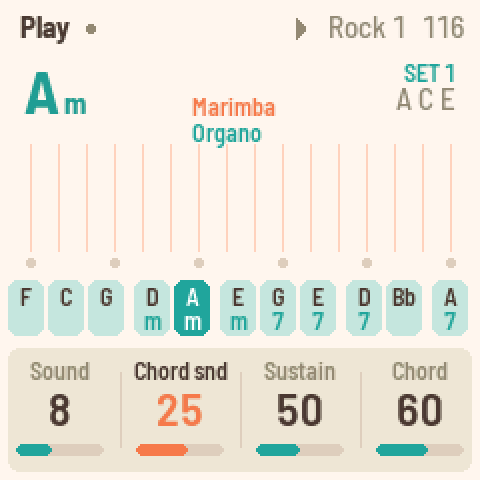
Licence note: the 64 voices are taken from the SynprezFM cartridges that ship with the Dexed synthesizer, and the repository states no separate licence for that voice data. Jambox, the Omnichord-style chord harp, plays DX7 voices on its strings and chords when they are loaded from its editor. This repository adds 64 of them to the firmware itself, renamed in Spanish without accents, with levels evened out in Jambox's host simulator, so no computer is needed. KNOB 1 picks the strings' sound and KNOB 2 the chord's, the name shows beside the chord, and voices loaded from the editor come first as U1 to U32. The two harp level knobs move to the second setup page. The patch also adds a GUIDE command to the editor's SysEx that returns the screen's parts as lines of position and size, so an app can explain what the screen shows. The repository holds the patch script, the added source and the voice tables, builds Jambox 0.8.1 with them applied, and has an install page, built from Jambox's firmware switcher, that can also put Jambox 0.8.1 back. It also commits the built packages and two .syx banks of the same voices for Jambox's editor.
Install notes
Open the install page in Chrome or Edge with the FM-1 on USB and press Install next to Jambox 0.8.1-sounds1, or use the package attached to the release. The same page installs Jambox 0.8.1 as published again. No other recovery steps are documented here; M-VAVE's own V15 package and updater put the stock firmware back.
Version history
| Version | Date | Notes |
|---|---|---|
| v0.8.1-sounds1 | 2026-11-27 | Package jambox-0.8.1-sounds1.fwsc, Jambox 0.8.1 with the 64 built-in voices. |