FM-1 Installer
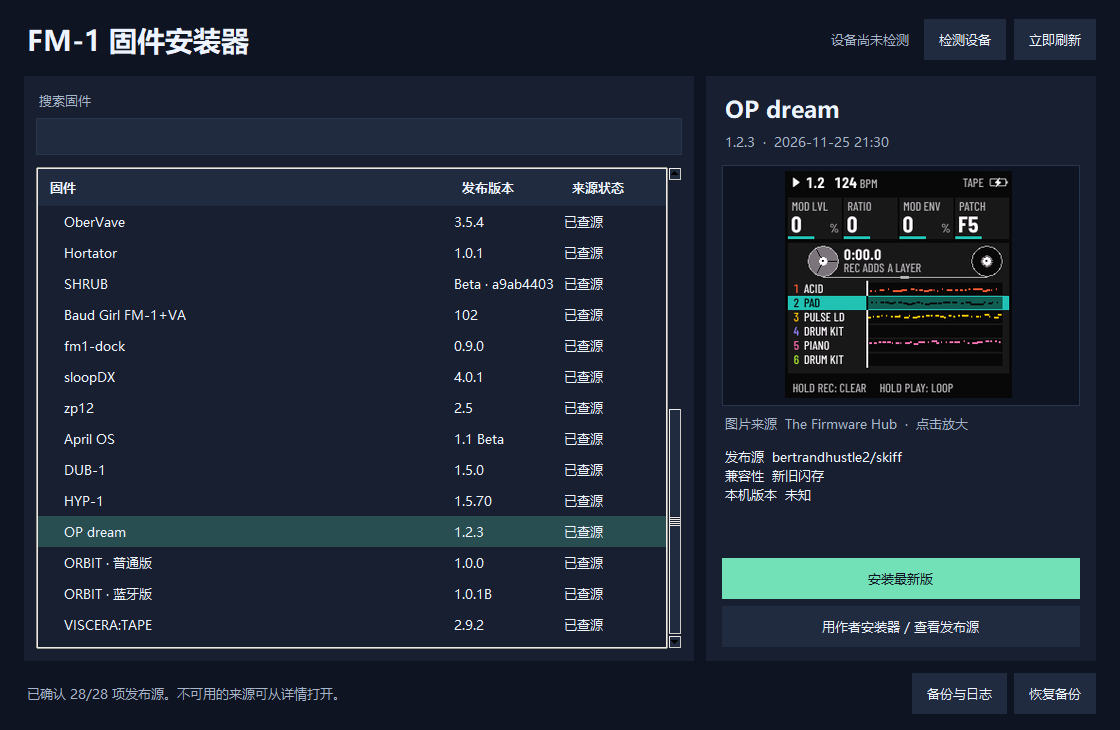
Portable Windows app, with a Simplified Chinese interface, that lists 28 FM-1 firmwares, checks the unit's flash chip, backs up the whole flash and installs a chosen release with M-Flasher.
by huangluzhi
- Distribution
- Prebuilt image you flash yourself
- License notes
- The LICENSE file is the MIT text. THIRD_PARTY.md lists M-Flasher (MIT), the Python, Pillow, Tcl/Tk and PyInstaller runtime, the compatibility list from The Firmware Hub (CC BY 4.0) and preview images that belong to their owners. No firmware file is committed to the repository.
- Source
- github.com https://github.com/huangluzhi/fm1-installer
- flasher
- backup
- catalog
- utility
- windows
Description
Rights warning: the app ships no firmware, but it fetches packages when you pick them, including M-VAVE's current stock package from its download page and the V15 image from M-VAVE's fm1_open repository, and it loads preview pictures from The Firmware Hub and FM1 Editor, whose rights belong to their owners. The list is built from each firmware's own releases or install page, checks the package's device identity and SHA-256 where one is given, and marks firmware unavailable on newer flash chips when compatibility is unconfirmed. Before writing it saves a full flash backup with a JSON file, then writes the firmware, verifies the result and restarts the unit. A restore button writes a saved backup back with the bootloader kept. The flashing component is jvitkauskas' M-Flasher v0.12.1 under MIT. It is a Python and Tk app built into a Windows x64 zip, and the README says flashing and recovery on real hardware are not yet verified.
Install notes
Download the Windows x64 zip from the release, extract the whole folder and run FM1 Installer.exe with one FM-1 on a USB data cable, pick a firmware, check its compatibility and install. Use the restore button with a full backup and its JSON file from the same unit to go back. Some firmwares need USB download mode as their author describes. The app's M-Flasher backup keeps the bootloader on restore.
Version history
| Version | Date | Notes |
|---|---|---|
| v0.1.0 | 2026-11-27 | First public Windows x64 portable build with 28 firmwares, release checks, previews, full flash backup and restore. |