FM-1 Firmware Zoo
Desktop app (Rust) that runs up to four emulated FM-1s side by side with any community firmware, shares a MIDI clock and keyboard between them, and also detects and flashes real FM-1 units over USB.
by jasonbot
Brick risk. Flashing this carries a known, documented risk of damaging the device.
- Distribution
- Prebuilt image you flash yourself
- License notes
- LICENSE.md holds the unmodified GPL-3.0 text, with no "or later" grant. Cargo.toml still declares MIT and the firmware README says the Rust application code is MIT, so the declarations conflict. The emulator crates are MIT; the firmware packages keep their authors' licences (GPL-3.0 for those from the Hub, Apache-2.0 for M-VAVE's stock V16 as the README records it, proprietary for FM-1+VA), recorded in firmware/README.md.
- Source
- github.com https://github.com/jasonbot/fm1-grid
- emulator
- midi
- flasher
- utility
Description
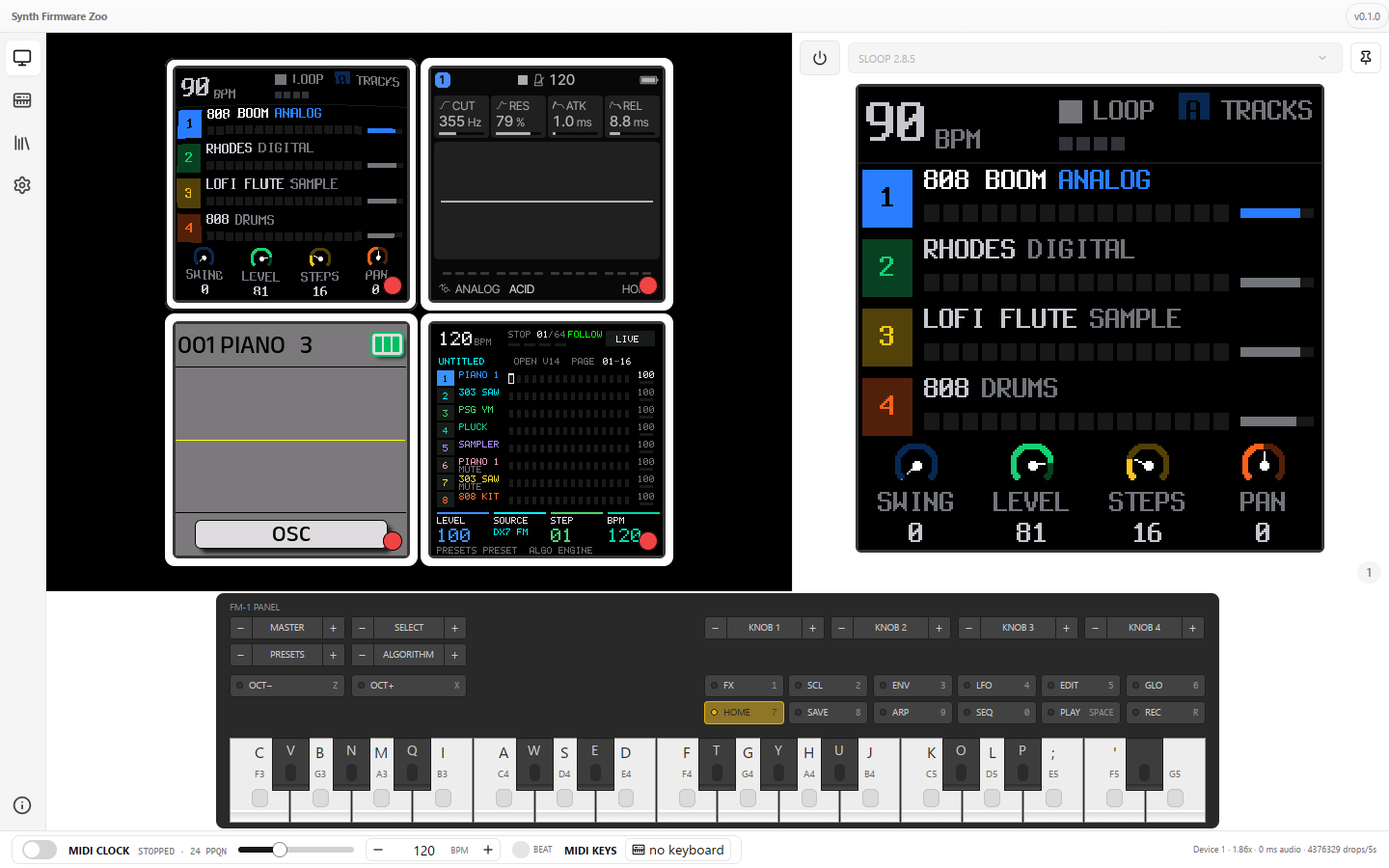
Rights warning: the build downloads six firmware packages into a git-ignored folder, including M-VAVE's stock FM-1 V16 package from M-VAVE's file server and Baud Girl's proprietary FM-1+VA 102 from baudgirl.com; the repository holds none of the files. V16 is not the V15 file this catalogue lists as licensed for redistribution. Each pane runs the fm1-emu CPU and display model with its own firmware and screen, mixes the four audio streams into one output, and shows a clickable FM-1 front panel that follows the selected pane. A MIDI graph routes system ports, running panes and connected units, and a metronome sends 24 PPQN clock with start and stop to every pane. The other four packages are SLOOP, Felucca and ChoralRoot from The FM-1 Firmware Hub and M-VAVE's open firmware V14, and a Library tab lists them and downloads more from the Hub and, as the README now lists, fm1-editor.com, Reverbose's FM-1 and SMK-37 lists and mutant.cloud, and a settings tab picks a colour theme, a light or dark mode and, for three of the themes, an accent colour. A pane can be pinned so its flash contents survive power-off. For live units, the app probes FM-1-named MIDI ports, and now SMK-37 and Starrykey port names too, with the M-UPGRADE handshake, shows which firmware is running, switches their clock and flashes a chosen package. A unit in ROM download mode is also listed, and with Rescue switched on it can be given the m-bootloader, on Linux, macOS (needs sudo) and Windows (needs administrator rights). An About tab shows the release history and licences. The repository also builds fm1-tty, a terminal version of the library, flashing, keyboard, metronome and MIDI routing. Since 1.0.0 a Cardputers section lists M5Stack Cardputer-Adv handhelds running fm1-card on the network, shows each one's status and the firmware packages on its SD card, keeps a catalog in sync with them and, for a Cardputer in ROM download mode, flashes the whole fm1-card image; the app also keeps a history of installs. The emulated panes accept MIDI in only. The author calls it a local tool, not a distributed binary, but since v0.1.1 the releases attach Windows, Linux and Flatpak builds, and since v0.1.4 a macOS zip.
Install notes
Since v0.1.1 the release page offers Windows and Linux builds and Flatpaks, and a macOS zip since v0.1.4, so a build is optional. To build, use Rust 1.91 or newer with cargo run --release; Linux needs ALSA and X11 or Wayland development packages. The first build downloads any missing firmware packages listed in fm1-performer/firmware/firmwares.json and checks their hashes; scripts/firmware.sh edits the list. Flashing a connected unit uses the same update path as other installers, so back up first and follow the brick-risk notes on the FM-1 device page. The Rescue option writes a replacement bootloader through the chip's ROM download mode, which the build fetches from the m-bootloader release and checks by hash.
Version history
| Version | Date | Notes |
|---|---|---|
| v1.0.1 | 2026-11-25 | The release notes only link the changelog. The commits since v1.0.0 fix a hang. |
| v1.0.0 | 2026-11-24 | The release notes only link the changelog. The commits since v0.1.6 add a Cardputers section that lists M5Stack Cardputer-Adv handhelds, reads their status and SD card firmware, syncs a catalog to them and flashes the fm1-card image, an install history for firmware flashed from the app and a refreshed baked-in ChoralRoot 0.46. |
| v0.1.6 | 2026-11-22 | The release notes only link the changelog. The commits add macOS updates through the app feed and show the running version in the update pill. |
| v0.1.5 | 2026-11-21 | The release notes only link the changelog. The release page carries the same Windows-store, Linux and macOS builds as 0.1.4. |
| v0.1.4 | 2026-11-20 | The release notes only link the changelog. It adds a macOS arm64 build, a zip, to the attached Windows and Linux builds. |
| v0.1.3 | 2026-11-19 | Cuts LCD lock contention and display work, supports hosted MSIX bundles in the updater, and adds jakehandy.com/h1 as a default firmware source. |
| v0.1.2 | 2026-11-19 | Reworks flashing on the Devices pane around one shared dialog with a download-mode button and firmware picker for download-mode units, flashes a library firmware from download mode, and stores recovery backups in a blob store. Allows m-bootloader installs on the newer flash chip, while the hardened flashing path refuses it on the new flash. |
| v0.1.1 | 2026-11-15 | First GitHub release page. It attaches Windows x64 and ARM64 executables for the app and the terminal version, Linux x86_64 and aarch64 archives and Flatpaks, and a checksum file; the release is titled Synth Firmware Zoo. Includes an hourly update check, updates through the Windows Store and hosted MSIX and Flatpak backends, shrub.audio as a default firmware feed, an About tab with release history and licences, and Rescue writing of m-bootloader to units in ROM download mode. |
| v0.1.0 | 2026-11-15 | Git tag; no GitHub release page. |