FM-GB
Game Boy (DMG) emulator firmware for the FM-1: you choose your own game ROM, it is packed into the firmware package in the browser, and the keys act as the d-pad and buttons.
- Distribution
- Browser installer (WebMIDI / WebUSB)
- License notes
- LICENSE covers FM-GB's own files and the platform's, file by file (LICENSING.md). The platform parts are Leo Kuroshita's felucca-bsp code and Charles Vestal's fm1-base code, used under MPL-2.0 with their permission. Fonts are SIL OFL 1.1, and JieLi SDK files are fetched at build time and never committed. No ROM, boot ROM or stock firmware image is in the repository.
- Source
- github.com https://github.com/Josh-McFarlin/fm1-gb
- Homepage
- josh-mcfarlin.github.io https://josh-mcfarlin.github.io/fm1-gb/
- game
- emulator
Description
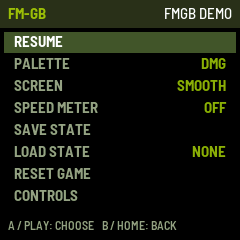
No game comes with it. The install page, or fm1gb.py on the command line, writes a ROM you supply into a prebuilt package and installs it over USB. Games up to 512 KiB go in as they are, and 1 MiB games fit when enough of their banks compress. The emulator covers the CPU, the picture, timer, the four sound channels and cartridges up to MBC5, with MBC3's clock; Game Boy Color-only games are refused. The menu offers palettes, screen scaling, a speed meter, save states and fast forward, and battery saves are kept in flash across reinstalls, apart for each game. The README gives test results against Blargg's and Mooneye's test ROMs, including failures in timing tests. It also says the firmware is new and has not yet run on a physical FM-1, only in the host simulator. It is built on fm1-base.
Install notes
Open the install page in Chrome or Edge with the FM-1 on USB, choose a Game Boy ROM you own, press Make it and then Install; or run gb/tools/fm1gb.py install, or tools/fm1_install.py with a package. To change the game, install again with another ROM. Saves live in a flash area the firmware update does not write, so they survive reinstalls. The README gives no recovery steps of its own.
Version history
| Version | Date | Notes |
|---|---|---|
| main @ 204e879 | 2026-11-22 | No tagged releases; this is the latest commit. |