OZMA
Firmware for TrimUI Brick (TrimUI)
Free, closed-source eight-track groovebox and tracker for the TrimUI Brick with built-in synths, a sampler with slices and chops, clip launching, effects and USB audio and MIDI. Public beta.
by Manticorees
- Distribution
- Prebuilt image you flash yourself
- License notes
- Free to download and use; redistribution, modification and reverse engineering are not allowed, per LICENSE.txt in the zip. The OZMA KIT sounds may be used in your own music, also commercially. The two USB kernel drivers are GPL-2.0, and their source is published as a separate asset on each release. The GitHub repository holds releases and documentation only.
- Homepage
- orumet.com https://orumet.com/
- Community
- groovebox
- tracker
- sequencer
- sampler
- synth-engine
- fx
- performance
- looper
- midi
- usb-midi
- usb-audio
- handheld
Description
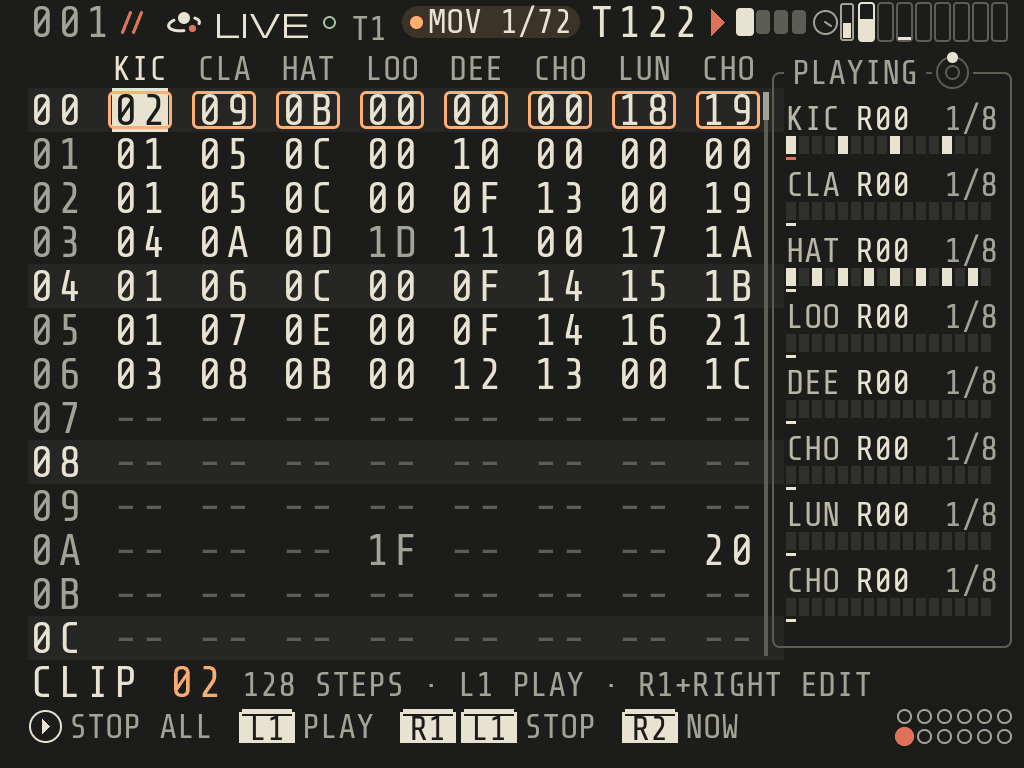
OZMA is a groovebox with a tracker workflow: eight STEP and LOOP tracks, a LIVE and SONG grid of clips, trig conditions, probability, micro timing, retrigs, slides and parameter and sound locks. It has five built-in synths, a SAMPLER with slices, warp and chops from your own WAV files, a MORPH instrument that turns any sound into a playable one, and MAKE LOOP and BOUNCE for printing what plays into a new loop clip. Mixing happens on the device, with an effects route map (delay, reverb, modulation, sidechain ducking, master OTT, EQ, DJ filter and limiter), scenes and a performance mode, and 25 lessons and three demo songs are built in. On the Brick the top USB port takes a class-compliant MIDI keyboard or a groovebox, and the bottom USB-C port makes the Brick a USB sound card and MIDI port for a computer or iPad. OZMA can update itself over Wi-Fi on spruce and the stock OS. The author tested release 0.9.2 on a physical Brick running spruce; the stock OS, CrossMix, NextUI, MinUI and Knulli are marked experimental. The same release also ships muOS and ports-folder packages for other handhelds, which the release notes say have not been tried on real hardware and which are not covered here.
Install notes
Download OZMA-0.9.2.zip from the GitHub release or itch.io, turn the Brick off, unzip it into the root of the SD card and let it merge folders, then open OZMA from the Apps menu. Knulli has its own OZMA-0.9.2-knulli.zip, installed by hand into the SHARE drive. From 0.8.2 on, spruce and the stock OS can update through PROJECT > UPDATE over Wi-Fi; on Knulli and NextUI install new versions by hand. Each package has a .sha256 file to check it against. Songs and samples live in App/OZMA/data and are kept across updates.
Version history
| Version | Date | Notes |
|---|---|---|
| v0.9.2 | 2026-11-14 | SONG rows now play all tracks together and empty cells are silent, an OZMA/Samples folder at the top of the SD card for your own WAVs, safer Wi-Fi updates with rollback only on real crashes, MIDI clock and stuck-note fixes, and new untested Knulli, muOS and ports-folder packages. Tested on a physical Brick running spruce. |
| v0.9.1 | 2026-11-13 | Clearer Wi-Fi update errors with its own certificate list, USB audio with an iPad, steadier MIDI clock, and experimental NextUI, MinUI and Knulli support. |
| v0.9 | 2026-11-12 | Adds the MORPH instrument and MORPH LOOP, MAKE LOOP, LOAD LOOP with smarter warp, the EFFECTS route map, DUCK MATTER sidechain, recording from a computer over USB and 25 in-app lessons. |
| v0.8.2 | 2026-11-09 | Adds updates over Wi-Fi, USB host mode for MIDI keyboards and class-compliant grooveboxes on the top port, USB sound card and MIDI device mode on the bottom port, MIDI clock in and out, and in-app lessons. |
| v0.8-beta.1 | 2026-11-08 | First open beta for the TrimUI Brick. |