Galax-z
Tool for OP-Z (Teenage Engineering)
Dot-matrix companion app for the OP-Z on Mac, Windows, Android, iPad and iPhone that follows the unit over USB or Bluetooth and shows its tracks, effects, notes and load, with pages that play it, a sampler, backups and the installer hub for Galax-z OS.
by Luis Tosado
- Distribution
- Prebuilt image you flash yourself
- License notes
- LICENSE is MIT, for what is Galax-z's own. OP-FREE parts are MIT, the piano sample pack is CC BY 3.0, and OWNERSHIP.md and THIRD_PARTY.md list the notices.
- Source
- github.com https://github.com/Luisga521/Galax-z
- companion-app
- visualizer
- midi
- sampler
- backup
- ios
- mac
- bluetooth
Description
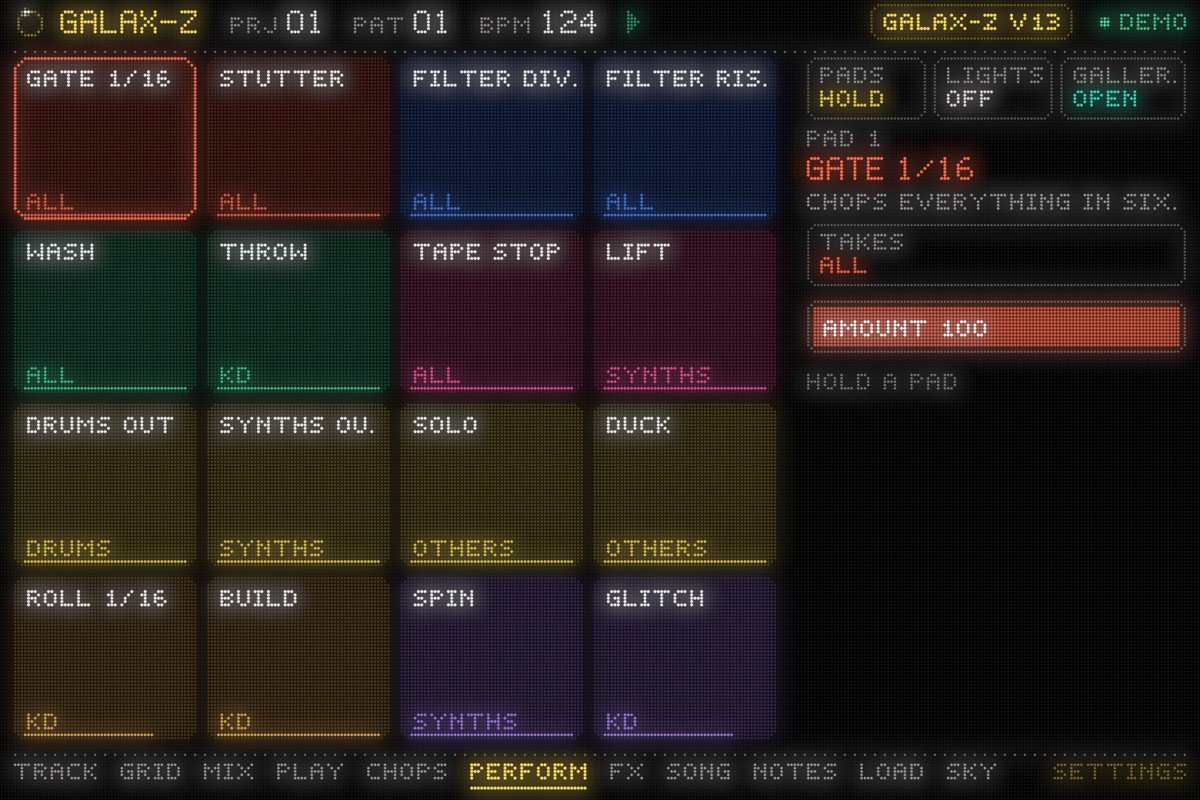
The app follows the OP-Z over USB-C, or over Bluetooth on iPad, iPhone and Android, and draws what it sends on a dot-matrix screen with pages for tracks with animations, effects, played notes over a keyboard, a sky view with each track as an arm, a sixteen by sixteen step grid, a mixer, song overview, a load meter and settings. Touching a control sends MIDI that changes the OP-Z the way its own knob would. PLAY has pads with scales, chords and grooves, PERFORM has gates, sweeps and stops held on a pad, CHOPS cuts a sound up for the module track and a sampler plays the OP-Z's USB audio through the device. The app learns MIDI controllers, backs up projects by reading only, and on a Mac its hub installs Galax-z OS and writes TE's original back. A demo OP-Z needs no hardware. The author calls it a work in progress; the status page says only volume and mute touch controls have been seen on a real unit, iPad and iPhone builds have run on the author's own devices only, the Mac test build is not notarized by Apple, and the Windows test build is not signed. The code was written with Claude. It includes Swift ports of parts of OP-FREE.
Install notes
The Mac test build, Galax-z-mac.dmg, is on the releases page: drag it to Applications and allow it once under System Settings, Privacy and Security, since it is not notarized. It needs macOS 15 or newer. Windows 10 or 11 (64-bit) and Android 11 or newer (arm64) test builds are on the same page as an unsigned setup program or zip and an APK. iPad and iPhone builds are made with Xcode following docs/BUILDING.md, and there is no App Store release. The app and its screens only read the unit; the hub that installs Galax-z OS replaces the OS, which the Galax-z OS entry covers.
Version history
| Version | Date | Notes |
|---|---|---|
| app-windows-2026.11.23 | 2026-11-24 | Windows test build, marked as a pre-release and not signed; ships as a setup program and a zip, finds the OP-Z over USB-C and pairs it over Bluetooth. Installing Galax-z OS from Windows has not been tried on an OP-Z. |
| app-android-2026.11.23 | 2026-11-23 | Android test build, marked as a pre-release and signed with a test key; an APK for Android 11 or newer that connects over Bluetooth or USB-C. Galax-z OS is installed from the Mac app, not from Android. |
| app-mac-2026.11.22 | 2026-11-23 | Mac test build, marked as a pre-release and not notarized; carries the app with the hub for installing Galax-z OS v13. |