Qew
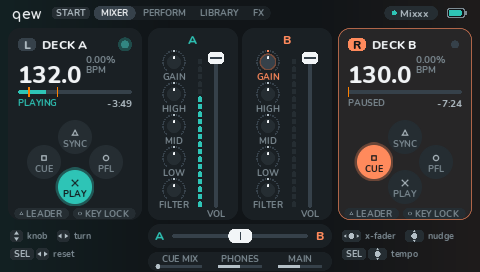
PSP homebrew that makes the console a USB-MIDI controller for the Mixxx DJ software, with two-deck transport, mixer, hotcue, loop, library and effect pages and deck feedback on the PSP screen.
- Distribution
- Prebuilt image you flash yourself
- Requires stock
- PSP custom firmware (ARK)
- License notes
- The LICENSE file is the GNU GPL version 3 and the README says GPL-3.0. The GPU set-up code is adapted from the XLT renderer, which in part comes from psp5 (GPL-3.0), and the USB driver structures follow PSPLINK's usbhostfs (BSD licence).
- Source
- github.com https://github.com/boubounokefalos/qew
- usb-midi
- midi
- controller
- dj
- homebrew
Description
A PSP program that shows up on the computer as a class-compliant USB MIDI device, so no driver or companion program is needed on the PC. It ships a mapping and script for Mixxx that the PSP's buttons and analog stick drive. Four pages, switched with START, cover play, cue, sync and headphone cue per deck, gain, three-band EQ, filter, volume and crossfader; hotcues, loops and beat jump; browsing the library and loading tracks; and two effect units. The PSP screen shows each deck's lit buttons, knobs, level, tempo, beat light and time left as Mixxx reports them. The program keeps the PSP awake while it runs and tells Mixxx to release held controls if the cable is pulled.
Install notes
Copy the PSP folder from the release zip to the root of the Memory Stick, which puts the program and its usbmidi.prx in ms0:/PSP/GAME/QEW/. Copy Qew.midi.xml and Qew-scripts.js from the zip's Mixxx folder into Mixxx's controllers folder, then enable the PSP's MIDI device in Preferences > Controllers and load the Qew mapping. Start Qew on the PSP before Mixxx, because Mixxx 2.5 does not pick up devices plugged in while it runs. The author tried a PSP-3004 and a PSP-E1004 with Mixxx 2.5.6 on Linux and Windows 11, and has not tried a PSP Go or macOS. It runs as an application from the game menu and writes nothing to the system firmware.
Version history
| Version | Date | Notes |
|---|---|---|
| 1.0.0 | 2026-11-26 | First release. |