Pocket Synth
Firmware for PortMaster-compatible handhelds (PortMaster)
Gamepad instrument for PortMaster handhelds such as the R36S, with guitar, flute and violin, piano and electric piano and drum modes plus a four-track loop recorder; also builds for macOS.
by FrostMiKu
- Distribution
- Prebuilt image you flash yourself
- Requires stock
- A Linux handheld with PortMaster support, 64-bit ARM, SDL2 and two analog sticks (tested on the R36S)
- License notes
- Read from the LICENSE file, which names "Pocket Instrument contributors" as the holder. The README says bundled third-party components, including DaisySP and SDL, keep their own licenses in the vendor folder.
- Source
- github.com https://github.com/FrostMiKu/pocket-synth
- Homepage
- github.com https://github.com/FrostMiKu/pocket-synth
- synth-engine
- sequencer
- drums
- performance
- open-source
Description
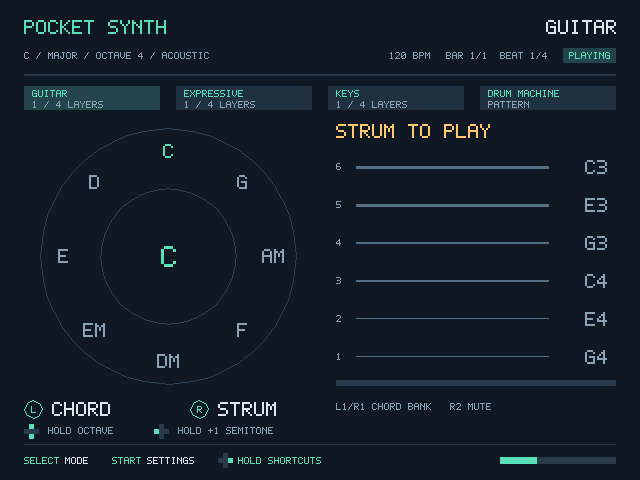
Pocket Synth turns the sticks and buttons of a handheld or a game controller into an instrument. The Guitar mode picks chords with the left stick and strums with the right stick, and a second layout picks the six strings one by one. Expressive plays synthesized flute and violin with a scale wheel or continuous pitch, Keys plays piano and electric piano on eight scale buttons with pitch bend and vibrato, and the Drum Machine has eight pads. A loop recorder with four synchronized tracks supports a count-in, overdubbing, undo, quantization and one or two bars, and settings and recordings are saved when the app exits. The R36S is the only tested handheld; the app runs as a PortMaster package on ARM64 Linux with SDL2 and two analog sticks, and a macOS app for Apple Silicon lets a controller connected to a Mac use the same controls. The sounds are generated in code with DaisySP. The README documents building on macOS and cross-compiling for the handheld with Zig.
Install notes
Extract the PortMaster zip from the release into the ports folder and launch Pocket Synth from the Ports menu. The app and its generated sounds live in their own folder, and nothing is flashed to the device. On macOS, unzip the Apple Silicon build; it is signed locally and not notarized by Apple.
Version history
| Version | Date | Notes |
|---|---|---|
| v2.3.0 | 2026-11-27 | Fn becomes the Meta key for shortcuts. Recording waits for the first note instead of counting in, and adds a capo of 0 to 11 frets for pitched instruments. |
| v2.2.3 | 2026-11-12 | Shows a four-beat count-in before recording, adds beat clicks that stay out of the recorded tracks, and captures attacks played up to 50 ms before recording starts. |
| v2.2.2 | 2026-11-11 | Picks the six guitar strings from low to high with the face and shoulder buttons, applies octave and semitone modifiers to new attacks, keeps the pitch of loop recordings and fixes the positions of the status text. |
| v2.2.0 | 2026-11-11 | Guitar, Expressive, Keys and Drum Machine modes with a four-track loop recorder; PortMaster and macOS packages. |