Classic Tabby
Firmware for SMK-37 Pro / Elite (M-VAVE)
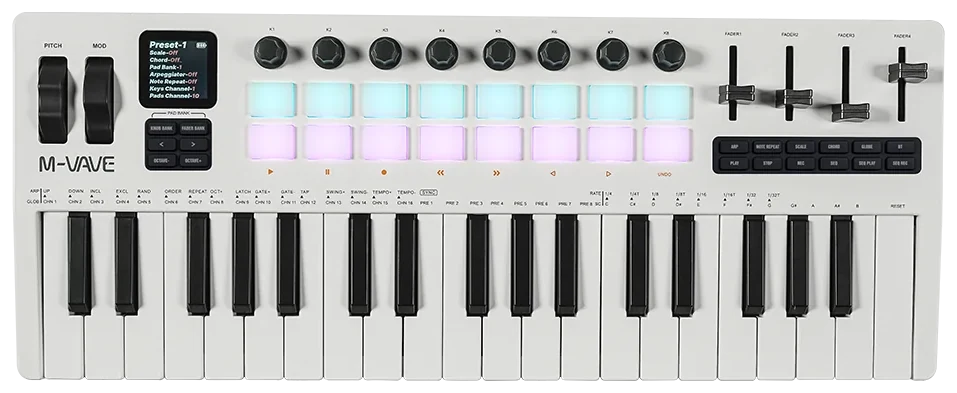
Fork of M-VAVE's SMK37 Open for the SMK-37 Pro that adds song mode, MIDI file import and per-row program and control change events, with a hosted workbench. It drops the sampler and the DX7 user library to make room.
by seattleuser0
- Distribution
- Browser installer (WebMIDI / WebUSB)
- Requires stock
- SMK-37 Pro (V16 factory firmware or an installed SMK37 Open); not the Elite
- License notes
- LICENSE.md is M-VAVE's SMK37 Open APP license (GPL-3.0-only with an additional permission to link the binary SDK), carried over from m-vave/smk37_open. The sdk/lib/libfm1_engine.a library is the proprietary binary that THIRD_PARTY.md lets be used, linked and redistributed for M-VAVE SMK-37 Pro and Elite devices only, and its git blob matches the one in smk37_open. sdk/firmware/ holds M-VAVE's stock V16 images for both models (git blobs ad5ff6a and 821236a), the files M-VAVE licenses for redistribution on those devices.
- Source
- github.com https://github.com/SeattleUser0/classic-tabby
- Homepage
- seattleuser0.github.io https://seattleuser0.github.io/classic-tabby/
- sequencer
- tracker
- midi
- fork
- editor
Description
Songs hold up to 128 rows, each pointing to one 64-step block per track, with up to four notes per step, probability, retrigger, per-row length and repeat counts, per-track output channels, queued jumps and loops. 16 songs are stored in the flash that held samples. The workbench imports Standard MIDI files (type 0 or 1) into songs, edits rows and blocks, and exports a .tabby file. Rows can carry program changes, bank selects and control changes that fire when the row starts, and the workbench holds definitions for fifteen external devices, including the FM-1 under Skiff, Melodee and Orange Cat, and a built-in rig profile, so presets can be picked by name. Version 3.0 keeps the start offset and length of each imported note in 480ths of a step, adds a track launch page that lets each of the eight tracks loop one of the song's patterns, a lead time per channel for program changes, and moves Bluetooth settings from the device to the workbench. Version 3.2 adds importer output channels taken from the file and a generated MIDI authoring guide. Version 3.3 is a diagnostic build that adds a full backup and restore of projects, songs and device settings, timing counters and a MIDI monitor script for the computer. Version 4.0 moves the storage boundary to make the user region 64 KiB smaller, removes the stock step editor and recording pages, refuses flash writes while the transport plays and keeps the timing counters in the normal build. Version 4.1 limits the 10 ms control pass to a 6 ms budget so MIDI sends and song scheduling are not delayed by screen drawing, renames the panel controls by their printed numbers and makes the update page retry a failed query. Version 4.2 turns fast MIDI on at power-up and adds a remote-control command over USB. Version 4.3.1 follows an external MIDI clock in song mode, with Start, Continue, Stop and Song Position Pointer from the master, and fixes the missing USB replies with CLOCK set to MIDI; its notes report checks on one SMK-37 Pro. Version 4.4 sends MIDI from a 0.5 ms hardware timer so notes leave within a few milliseconds. Version 4.5 plays larger clips, with any number of notes per step and rows of up to 128 steps, 4.6 stores songs as scenes and clips with a master cycle, and 4.7 adds a CLIPS page that launches clips from the pads. Versions 4.8 to 4.13 add a STEP page that edits a clip's notes on the pads, real-time recording from the keys and MIDI in, a panel clip workflow with new clips, lengths, copies, a click and count-in, clip chains, a scene chain, a program and bank per clip and four recorded controller knobs. Versions 4.14 to 4.20 add per-clip settings on CLIP SETTING (click level, controller numbers, transpose, shuffle, play quantize, step size and direction), delete and move for scenes, clip deletion and the printed button names. Versions 4.21 to 4.23 add note clearing in a take, a clip shift, NEW SONG on the panel, NOTE REPEAT that repeats held notes and a step loop. Version 1.0 adds no function and comes with a two-hour soak test and a stage checklist, 1.0.1 fixes program changes in a two-scene loop, 1.0.2 adds an EVENT LEAD song setting, 1.1 makes the screen text larger with fewer items per page and 1.2 moves messages to the top of the screen; from 4.14 the notes say each release was installed on a device and passed a device test suite, a full backup, a restore and a verify before publication. The 4.5.1 to 4.13 notes report tests by remote command on one SMK-37 Pro, and 4.11 and 4.11.1 were not installed because of a workbench backup fault fixed in 4.11.2. It was built on Linux with a reproducible toolchain, byte-identical to the Windows toolchain under Wine. The release notes for 2.0 through 3.3 say it has been tested on the host and in the browser simulator only and is not yet validated on hardware, those for 4.0 say the storage layout was checked on a device with a separate probe build but 4.0 itself has not been installed on one, those for 4.1 say it has not been installed on a device yet, those for 4.2 list a known issue in which the device sends no USB replies while CLOCK is set to MIDI, which the 4.3.1 notes trace to the SDK and fix, and 4.0 warns that old sample and DX7 data is erased after confirmation. Release 1.0 is SMK37 Open V01 unmodified. Written with Claude.
Install notes
Open the workbench in desktop Chrome or Edge with MIDI and SysEx permission, check the Device update tab shows the build number printed in the release notes (fef558ab16e275b4 for tabby-v1.2), and confirm the device identity reads SMK-37 Pro_016 or SMK-37 Pro_8000001 before continuing. Make a full backup in the workbench first and keep the file, because tabby-v04.0 moves the storage and every project, song and device setting stays unreadable until you restore it; updating from v04.0 or later needs no restore. Back up DX7 voices too, because sample and DX7 data is erased once you confirm on first boot, and export songs as .tabby before using Restore factory V16, which overwrites the last part of song storage. The workbench has a Restore factory V16 option. An offline copy of the workbench is in the release.
Version history
| Version | Date | Notes |
|---|---|---|
| tabby-v1.2.1 | 2026-11-21 | Any button, pad, key or knob press takes an on-screen message away at once, PLAY, STOP and REC stay readable while a message is up, and a muted internal sound no longer loads the sound engine. Same storage layout; full backup first. |
| tabby-v1.2 | 2026-11-20 | Moves on-screen messages to a box across the top, so they no longer cover the pads' cells, repaints CLIPS and SCENES only when something they show changes and fixes a song that could start wrong at SEQ PLAY. The firmware can now report the pixels it sent to the screen, which the release test compares with the simulator. Same storage layout; full backup first. |
| tabby-v1.1 | 2026-11-19 | Redraws the screen with larger characters, nothing smaller than 10 by 14 pixels and larger still for stage information, and fewer items per page. No new function; songs, projects and timing as on tabby-v1.0.2. Same storage layout; full backup first. |
| tabby-v1.0.2 | 2026-11-19 | Adds EVENT LEAD, a song setting that sends a scene's program changes before its downbeat. It is off by default and songs play as on tabby-v1.0.1 while it is off. Same storage layout; full backup first. The notes report device tests and two soak runs on a device. |
| tabby-v1.0.1 | 2026-11-19 | Fixes songs of two looping scenes, where each scene's program changes are now sent every time the scene is entered. Use it instead of tabby-v1.0. Same storage layout; full backup first. |
| tabby-v1.0 | 2026-11-19 | Version 1.0 has no new function, only a full regression with a two-hour soak, a screen fix for track select and mute and a one-page stage checklist. The notes say it skips most scene program changes after the first pass of a two-scene loop and point to tabby-v1.0.1. Same storage layout; full backup first. |
| tabby-v04.23 | 2026-11-18 | Adds a step loop on CLIPS, where holding NOTE REPEAT and pad 9, 10, 11 or 12 repeats the last 1, 2, 4 or 8 steps of everything playing. Same storage layout; full backup first. |
| tabby-v04.22 | 2026-11-18 | NOTE REPEAT now repeats a held key or pad while it is held, and the keys and pads switch moves to KNOB BANK with NOTE REPEAT. Same storage layout; full backup first. |
| tabby-v04.21 | 2026-11-18 | Adds clearing of notes during a take with FX and a key, a one-step clip shift with KNOB BANK and OCTAVE, and NEW SONG in ACTIONS. Same storage layout; full backup first. |
| tabby-v04.20 | 2026-11-18 | Adds a DIRECTION setting for each clip on CLIP SETTING (forward, reverse or forward then reverse). Same storage layout; full backup first. Clips that use it are silent on older firmware. |
| tabby-v04.19 | 2026-11-18 | Adds STEP SIZE for each clip on CLIP SETTING, with half speed, double speed and triplet steps. Same storage layout; full backup first. |
| tabby-v04.18 | 2026-11-18 | Renames every button on the screen, in Help and in the guide by the word printed on it; no function changes. Same storage layout; full backup first. |
| tabby-v04.17 | 2026-11-18 | Adds SHUFFLE and PLAY QUANTIZE for each clip, and CLIP SETTING grows to three pages. Same storage layout; full backup first. |
| tabby-v04.16 | 2026-11-18 | Adds delete and move for a scene on the SCENES page, takes an armed recording off when the song is stopped, and adds the manual as one printable PDF. Same storage layout; full backup first. |
| tabby-v04.15 | 2026-11-17 | Adds TRANSPOSE (-12 to +12 semitones) and DELETE CLIP on CLIP SETTING, and an updated manual. Same storage layout; full backup first. |
| tabby-v04.14 | 2026-11-17 | Adds CLICK LEVEL and a controller number for each of K1 to K4 on CLIP SETTING, makes the full backup name a song it cannot read, and fixes the workbench dropping a clip chain and length when a song was read back. Same storage layout; full backup first. |
| tabby-v04.13 | 2026-11-17 | Adds PROGRAM, BANK MSB and BANK LSB per clip, sent when the track enters the clip, and four controller knobs (K1 to K4 on CLIPS, controllers 74, 71, 1 and 11) that a take records. Same storage layout; full backup first. |
| tabby-v04.12 | 2026-11-17 | Adds the scene chain on the SCENES page, which sets how many times a scene plays, whether the next follows or it stays, and a hold, with a scene pad pressed while stopped reserving the start. Same storage layout; full backup first. |
| tabby-v04.11.2 | 2026-11-17 | Fixes the workbench page, whose full backup, verify and restore stopped on a song with a scene stored on the panel. The firmware is tabby-v04.11's. Use this page instead of those of v04.10, v04.11 and v04.11.1. |
| tabby-v04.11.1 | 2026-11-17 | First attempt at the workbench backup fix for songs with a panel-stored scene; the notes say a second reader was still faulty and tabby-v04.11.2 corrects both. The firmware is tabby-v04.11's. |
| tabby-v04.11 | 2026-11-17 | Adds clip chains in CLIP SETTING (next clip or stop, after a clip end or 1 to 512 steps, repeat count) and ends the count-in exactly on the beat. Same storage layout; full backup first. The notes say it was not installed on a device because the backup page fault found afterwards. |
| tabby-v04.10 | 2026-11-17 | Adds a panel clip workflow with new clips from an empty pad, a clip length, copy to pad, a click and count-in, and scenes stored from the panel. Songs changed on the device are saved in a form older firmware does not read; full backup first. The workbench page of this release cannot back up songs with a stored scene. |
| tabby-v04.9.3 | 2026-11-17 | Diagnostics shows the flash chip's JEDEC ID and size as a report only; the notes say nothing checks it. Otherwise tabby-v04.9.2. |
| tabby-v04.9.2 | 2026-11-16 | Fixes the CLIPS page after a stop, where a launched clip kept a green pad and could not be reserved for the next play. Hardware tested on one SMK-37 Pro by remote keys and MIDI in. |
| tabby-v04.9.1 | 2026-11-16 | Fixes HOME on the STEP page, which did nothing while a clip was open in v04.8 and v04.9. Installed and tested on one SMK-37 Pro. |
| tabby-v04.9 | 2026-11-16 | Adds real-time recording into the selected clip from the keys, pads or MIDI in, with input quantize, thinned controllers, overdub and one undo level per take. Same storage layout; full backup first. |
| tabby-v04.8 | 2026-11-16 | Adds the STEP page, which edits a clip's notes on the pads and keys with velocity, start, length and probability, four undo levels and unsaved-clip playback. A clip edited on the device is stored in the v3 clip format, which needs v04.5 or later. Same storage layout; full backup first. |
| tabby-v04.7.1 | 2026-11-16 | A clip pad pressed while the song is stopped reserves its clip for PLAY, as on the MC-707, and the two mutes (all outputs and internal sound only) look different. Same storage layout; full backup first. |
| tabby-v04.7 | 2026-11-14 | Adds a CLIPS page opened with BT, where the pads show the selected track's clips and launch or stop them on the next master cycle, scene recall with lit pads on the SONG page, and a mute that also holds a track's song notes off MIDI out. Same storage layout; the notes advise a full backup first and report hardware tests on one SMK-37 Pro by remote command. |
| tabby-v04.6 | 2026-11-14 | Songs can be stored as scenes and clips with a master cycle of 2 to 128 steps on which launches and scene recalls land; the importer writes scenes by default. Songs from earlier versions play unchanged. Same storage layout; full backup first. The notes report hardware tests on one SMK-37 Pro, and say the device pages still show rows and patterns. |
| tabby-v04.5.1 | 2026-11-14 | Fixes the workbench page of tabby-v04.5, which could not import parts that need the larger clip form. The firmware is tabby-v04.5's with its version text. The notes report six imported songs played back on one SMK-37 Pro with every expected note sent. |
| tabby-v04.5 | 2026-11-14 | Plays larger clips from their event lists, with any number of notes on a step, controller, pitch bend and pressure events and rows of up to 128 steps, and stores a clip's own program and bank. Its page cannot import the larger clips, which tabby-v04.5.1 fixes. Same storage layout; full backup first. |
| tabby-v04.4 | 2026-11-14 | Timed MIDI out; every queued note and clock byte carries its due time and a 0.5 ms hardware timer sends it, so song notes leave within 1.9 ms for one line and 3 ms for eight on every screen page. Notes due together leave as one burst, and external clock follow stays one block ahead of the master. Removes the 0xF9 bytes added in v04.3.1, since the missing USB replies were a fault in the developer's measuring tool. Same storage layout; the notes advise a full backup first. |
| tabby-v04.3.1 | 2026-11-13 | Song mode follows an external MIDI clock over USB or Bluetooth, with the master controlling start, continue, stop and song position, and USB replies now work with CLOCK set to MIDI, which fixes the v04.2 known issue. Same storage layout as v04.2, though the notes advise a full backup first. The notes report hardware checks on one SMK-37 Pro. Tag tabby-v04.3 was never released and the notes say not to install it. |
| tabby-v04.2 | 2026-11-12 | Turns fast MIDI on at power-up so song notes leave the DIN output sooner, and adds a remote control over USB for status, song select, play, stop and named panel controls. The notes list a known issue, fixed in tabby-v04.3.1, where the device sends no USB replies while CLOCK is set to MIDI, so the workbench cannot reach it until CLOCK is set back to INT. Takes the same storage layout as v04.1, so no move, but the notes advise a full backup first. |
| tabby-v04.1.1 | 2026-11-10 | Same device firmware as tabby-v04.1; only the 32-byte build identity and package checksums differ. Updates the workbench page, the Help and the testing guide, so reinstalling is optional and no backup is needed. |
| tabby-v04.1 | 2026-11-10 | Keeps the 10 ms control pass within a 6 ms budget so MIDI waits lose the 20 ms tail, renames panel controls by their printed numbers and makes the update page retry a failed query. A normal update from v04.0 with no storage move; not yet installed on a device per the release notes. |
| tabby-v04.0 | 2026-11-09 | Moves song storage so the user region is 64 KiB smaller, so projects, songs and settings need a full restore from a backup after the install and Bluetooth pairings are lost once. Removes the stock step editor and recording pages, moves sync and MIDI settings to a SEQ page, refuses flash writes while the transport plays and puts the timing counters in the normal build. The notes say this build has not been installed on a device yet. Test release tabby-p0-probe64 is not listed. |
| tabby-v03.3-diag | 2026-11-08 | Diagnostic build with the tabby-v03.2 firmware and storage layout plus timing counters. Adds a full backup and restore in the workbench that also holds device settings, with a read-back check. Playback is unchanged and the notes say it is not yet validated on hardware. Release tabby-p0-probe64, a pre-release that moves the storage boundary, is a test build and is not listed. |
| tabby-v03.2 | 2026-11-05 | Adds a read-only Wrong Room rig profile, four more device profiles, importer output channels taken from the MIDI file, and a built-in MIDI authoring guide. The firmware is unchanged apart from the version label, and the notes say it is not yet validated on hardware. Release tabby-v03.1 only added a rewritten manual and the version on the boot screen. |
| tabby-v03.0 | 2026-11-04 | Keeps imported notes' exact timing, adds a track launch page, a lead time per channel and Bluetooth settings in the workbench, and removes the device's BLE and NAME pages. Songs from tabby-v02.0 still play. |
| tabby-v02.0 | 2026-11-03 | Adds song mode, MIDI file import, row events and a device library; removes the sampler, the DX7 user library, the operator editor pages and the factory scenes. |
| tabby-v01.0 | 2026-11-02 | SMK37 Open V01 unmodified, built on Linux; the build ID differs from M-VAVE's only through line endings. |