nanohardcore
Firmware for NanoCore (Livtra)
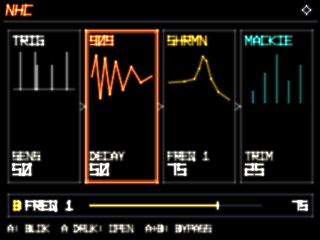
Experimental HARDCORE edition for NanoCore firmware 1.2 that replaces the effect chain with a TR-909 bass drum, a Sherman-style filter and a Mackie channel, and the Livtra screen with its own vector interface, installed from a web page.
by Plieuw
- Distribution
- Browser installer (WebMIDI / WebUSB)
- Requires stock
- NanoCore firmware 1.2
- License notes
- The LICENSE file is the GNU GPL version 3 text and the README says GPL-3.0. The NanoCore instruction set and ABI come from re-nanocore (MIT), and the project is not affiliated with Livtra.
- Source
- github.com https://github.com/Plieuw/nanohardcore
- Homepage
- plieuw.github.io https://plieuw.github.io/nanohardcore/
- fx
- drums
- filter
- amp-modeling
- patch
- web
- usb-midi
- ble-midi
- research
Description
The signal chain is a trigger or drum input, a transient detector, a TR-909 bass drum modelled at component level, a Sherman-style dual switched-capacitor filter with a HARMONICS clock divider, and a Mackie 1202-VLZ PRO channel with preamp, low cut, EQ and gain stages. The project documents measurements against real units, aliasing tests and offline demo renders, all in freestanding C99. On the pedal it takes the route of re-nanocore's hardware-tested 1.2 Octaver: a patch in the FX2 and pitch slot with a reset shim, four hooks, a larger audio ring and UI hooks. For the first 3 seconds after power-on the stock firmware runs, then HARDCORE takes over the audio chain, MIDI notes and control changes over USB and Bluetooth, the screen and both knobs, with 47 settings on a vector interface. The original chain takes over again if the CPU limit is exceeded, and the updater commands stay native. The web installer only accepts a pedal on stock 1.2, makes a backup, and can restore the stock image. The repository's manifest holds the project's own code plus 78 bytes of original instructions at the hook sites, and no vendor image. The release notes say it has not been tested on hardware, and the documents are mostly in Dutch.
Install notes
Use desktop Chrome or Edge, also on a Chromebook, with the pedal connected by USB, headphones and audio cables removed and ToneCommand closed. Open the install page, press Install, allow MIDI and pick the Lupgrader bootloader; the install takes about two minutes. The page makes its own backup, and a separate read-only backup page exists. Keep the backup file; "Restore original" and "Resume interrupted upload" are on the same page. The README gives the residual risk: if an image does not start, the only known recovery is the updater, and whether the bootloader offers DFU itself is not known.
Version history
| Version | Date | Notes |
|---|---|---|
| v0.1-beta1 | 2026-11-27 | Pre-release. First beta of the HARDCORE edition with the audio chain and the own screen and knob interface; not tested on hardware. |