Line 6 M5 Arduino MidiSwitch
Tool for M5 / M9 / M13 (Line 6)
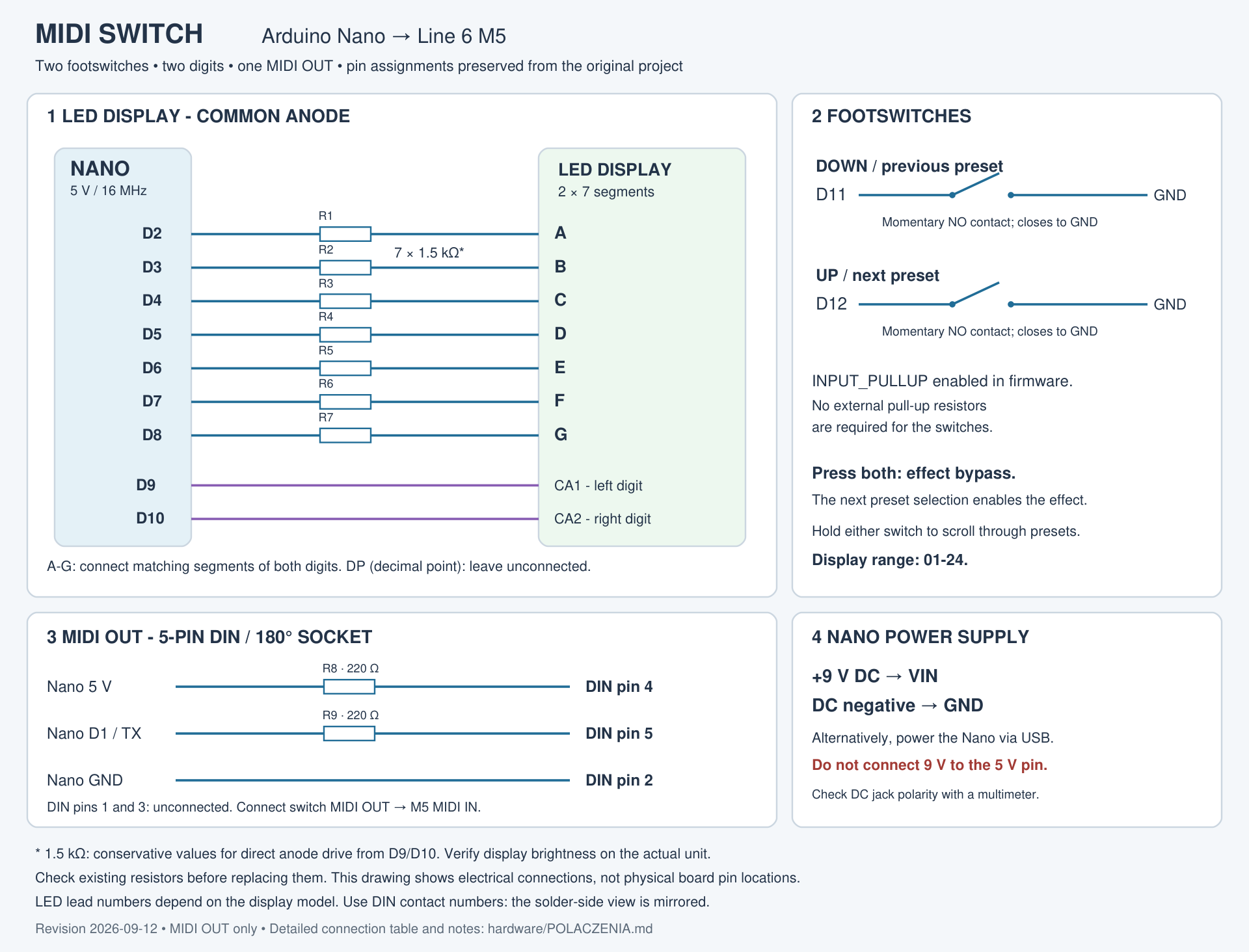
Arduino Nano sketch, wiring diagram and tests for a two-footswitch MIDI controller with a two-digit LED display that steps through the M5's 24 presets and bypasses the effect.
by beepoo304
- Distribution
- Build from source yourself
- Source
- github.com https://github.com/beepoo304/line6-m5-arduino-midiswitch
- arduino
- midi
- controller
- footswitch
- diy
- hardware
Description
A separate DIY box, not a change to the pedal. It sends MIDI program changes 0 to 23 on channel 1 from a MIDI OUT socket to the M5's MIDI IN, with an UP and a DOWN footswitch that wrap at the ends, repeat when held and bypass the effect when pressed together. The display shows the last preset the controller sent, since it cannot receive from the M5. The sketch needs no external libraries and builds for the classic Nano with an ATmega328P. It is a cleaned-up version of a design the author built and sold in 2017 and 2018, with the original photos, an archived original sketch and a simulation test of the compiled program that passes 45 checks. The README says the new sketch and wiring diagram have not been checked on a physical unit.
Install notes
Name the folder MIDI_SWITCH, open the sketch in Arduino IDE, select Arduino Nano with the ATmega328P (the old bootloader on many clones) and upload with the MIDI cable disconnected from the M5. Set the M5 to MIDI channel 1 and wire the box as in the diagram and the wiring guide.
Version history
| Version | Date | Notes |
|---|---|---|
| main @ 740c5d5 | 2026-10-24 | No tagged releases; this is the latest commit. |