Push Surface
Tool for Push 2 and disting NT (Ableton, Expert Sleepers)
Mac and Windows app that turns a Push 2 into an editor for an Expert Sleepers disting NT. Pads, encoders, buttons and screen edit slots, parameters, the algorithm library, SD presets and mappings. The Push talks MIDI and USB to the computer, the NT talks SysEx.
by Greg Dalmata
- Distribution
- Prebuilt image you flash yourself
- Source
- github.com https://github.com/dregdrawer/push-surface
- Homepage
- github.com https://github.com/dregdrawer/push-surface#readme
- controller
- editor
- sysex
- usb-midi
- midi
- desktop
Description
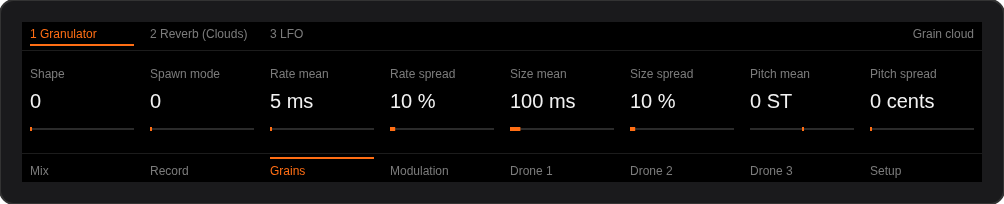
The app sits between the two devices; they are never connected to each other. The NT is controlled over its USB MIDI SysEx interface: on connecting it reads the preset, parameter pages and value ranges, then polls values so knob turns on the module show on the Push. The Push is put in User mode, its buttons, encoders and pads arrive as MIDI, and its 960 by 160 display is drawn over its USB bulk endpoint. Modes cover device parameters, adding algorithms, browsing and saving presets, the performance page, mappings, a mirror of the NT's front panel, CPU load and a pad scale layout. A demo mode simulates an NT with its algorithm library. Ableton Live is not needed, and can run alongside once it is told to leave the Push. The performance page needs disting NT firmware 1.16 or later. Nothing is flashed.
Install notes
Download the DMG (Apple Silicon, needs Node.js 20 or newer) or the Windows zip from the releases page. The Mac app is not notarised and Windows SmartScreen warns because it is not code-signed. On Windows the Push screen needs a WinUSB driver, which installing Live provides or Zadig can add. Set the NT's SysEx Device ID to match the app's settings.
Version history
| Version | Date |
|---|---|
| v1.6.0 | 2026-11-03 |